Join us at FabCon Atlanta from March 16 - 20, 2026, for the ultimate Fabric, Power BI, AI and SQL community-led event. Save $200 with code FABCOMM.
Register now!The Power BI Data Visualization World Championships is back! Get ahead of the game and start preparing now! Learn more
Hi all,
I have a table with tickets and I need to find out how many blocker tickets were open at the same time per month.
| TicketID | Created | Resolved | Priority |
| 1 | 01.04.2021 | 01.04.2021 | Blocker |
| 2 | 01.04.2021 | 03.04.2021 | Standard |
| 3 | 05.04.2021 | 31.06.2021 | Blocker |
| 4 | 07.04.2021 | 11.04.2021 | Blocker |
| 5 | 15.05.2021 | 20.05.2021 | Blocker |
So the result should be:
Found some measures for overlapping values, but they always count per ticket and not by month, or the ticket always counts for the month it was created, but should be counted in every month it was open.
Thanks in advance,
Greetings Patrick
Solved! Go to Solution.
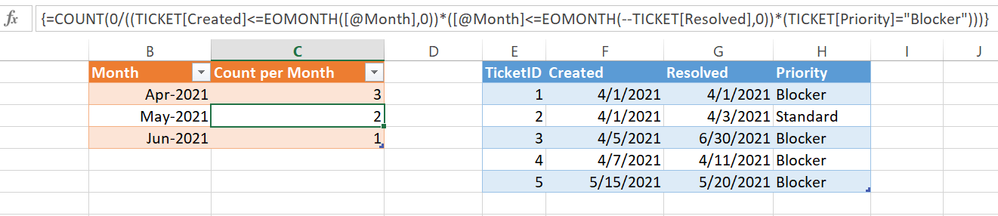
Excel worksheet formula is powerful enough to solve this simple question,
| Thanks to the great efforts by MS engineers to simplify syntax of DAX! Most beginners are SUCCESSFULLY MISLED to think that they could easily master DAX; but it turns out that the intricacy of the most frequently used RANKX() is still way beyond their comprehension! |
DAX is simple, but NOT EASY! |
Excel worksheet formula is powerful enough to solve this simple question,
| Thanks to the great efforts by MS engineers to simplify syntax of DAX! Most beginners are SUCCESSFULLY MISLED to think that they could easily master DAX; but it turns out that the intricacy of the most frequently used RANKX() is still way beyond their comprehension! |
DAX is simple, but NOT EASY! |
Hi @Patrick_BT ,
You'll need to create a calendar dimension table. There's plenty of examples online either in DAX or Power Query (recommended). Your calendar table will need at leaste Date and Month/Year (MM.yyyy).
Once you have that, the basic measure structure for your counts would be something like this:
_openTickets =
VAR __maxDate = MAX(calendar[date])
VAR __minDate = MIN(calendar[date])
RETURN
CALCULATE(
DISTINCTCOUNT(yourTable[TicketID]),
yourTable[Priority] = "Blocker",
FILTER(
yourTable,
yourTable[Created] <= __maxDate
&& yourTable[Resolved] >= __minDate
)
)
Use calendar[YearMonth] and [_openTickets] in your visual.
Pete
Proud to be a Datanaut!
Hi Pete,
thanks, I have created the calendar table and the measure already looks good.
Is it possible to extend it so that not all tickets from e.g. 04.2021 are counted, but only the maximum number of concurrently open tickets?
Ticket ID 1 is currently also counted although there was no overlap with the other tickets in April.
Many greetings
Patrick
The Power BI Data Visualization World Championships is back! Get ahead of the game and start preparing now!
| User | Count |
|---|---|
| 19 | |
| 9 | |
| 8 | |
| 7 | |
| 6 |