cancel
Showing results for 
Search instead for 
Did you mean: 

Get Fabric certified for FREE! Don't miss your chance! Learn more

Reply
Sk1X1
Frequent Visitor

On-premises Gateway - Refresh data

Hello, I created some pages in my PowerBI desktop and now I am trying to move them into Web. I published it to my account and now I'm looking for the way how to refresh data. I installed On-premises Gateway and now I'm not sure how to connect it with the pages on the web.


I expect that when I published my pages and installed Gateway I would be able just to click on Refresh, but I guess that is not true. So how can I connect my gateway with my reports?


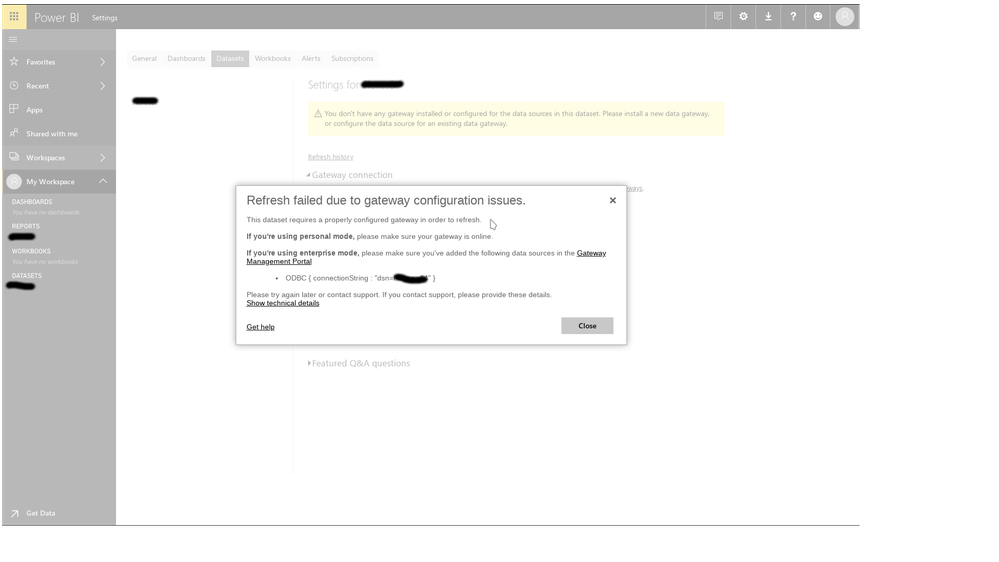
This is what happened when I click on Refresh now in dataset menu (three dots). 

Screenshot_20180423_094209.png

So what should I do now? 


Thank for any advice! 🙂

1 ACCEPTED SOLUTION
Anonymous
Not applicable

@Sk1X1,

Do you have ODBC data source in the dataset? If that is the case, you can add the ODBC data source within gateway following the guide in this similar thread. Once you add data source, you can set schedule refresh for your dataset.

Regards,
Lydia

View solution in original post

1 REPLY 1
Anonymous
Not applicable

@Sk1X1,

Do you have ODBC data source in the dataset? If that is the case, you can add the ODBC data source within gateway following the guide in this similar thread. Once you add data source, you can set schedule refresh for your dataset.

Regards,
Lydia

Helpful resources

Announcements
Join our Fabric User Panel

Join our Fabric User Panel

Share feedback directly with Fabric product managers, participate in targeted research studies and influence the Fabric roadmap.

February Power BI Update Carousel

Power BI Monthly Update - February 2026

Check out the February 2026 Power BI update to learn about new features.

FabCon Atlanta 2026 carousel

FabCon Atlanta 2026

Join us at FabCon Atlanta, March 16-20, for the ultimate Fabric, Power BI, AI and SQL community-led event. Save $200 with code FABCOMM.