Don't miss your chance to take the Fabric Data Engineer (DP-600) exam for FREE! Find out how by attending the DP-600 session on April 23rd (pacific time), live or on-demand.
Learn moreJoin the FabCon + SQLCon recap series. Up next: Power BI, Real-Time Intelligence, IQ and AI, and Data Factory take center stage. All sessions are available on-demand after the live show. Register now
Hi All,
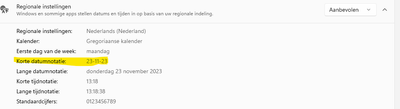
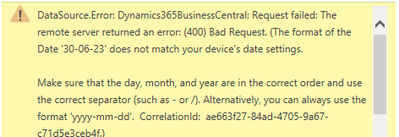
I'm encountering an error trying to import Business central webservice tables using odata(see images). The error implies that my device settings don't match the data, but according to my windows settings my date format seems to be the same, data and device's settings are both in dutch date format. Does anyone know how to resolve this issue? All the other webservice tables which include date columns seem to be working fine.
Thanks in advance!
Solved! Go to Solution.
Hi @thomma ,
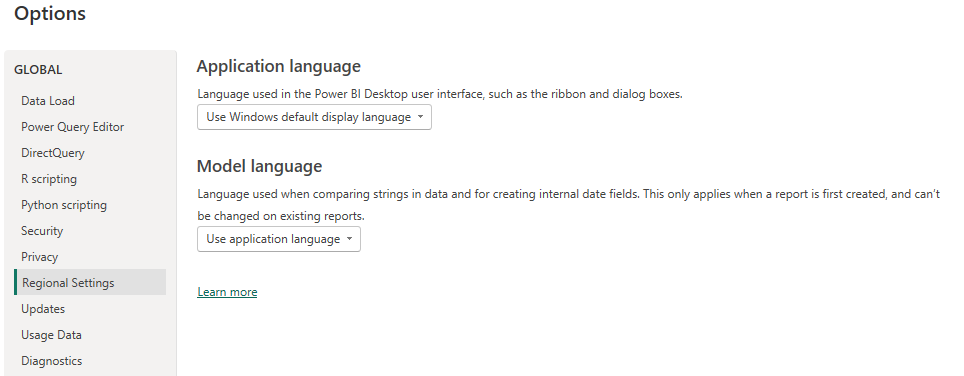
1. Check Regional Settings in Business Central and Verify Power BI Regional Settings. Make sure they match each other.
2. Clear All Permissions: If you still see an error, clear the Global Permissions for the OData service URI and try again. To clear Global Permissions, go to File > Options and Settings > Data Source Settings > Clear All Permissions.
3.Try importing a single record (30-06-23) with a date to see if the error persists. This can help isolate if the issue is with all date data or a specific entry.
4. Finally, consider using the standard date format yyyy-mm-dd as suggested in the message.

Best Regards,
Gao
Community Support Team
If there is any post helps, then please consider Accept it as the solution to help the other members find it more quickly.
If I misunderstand your needs or you still have problems on it, please feel free to let us know. Thanks a lot!
How to get your questions answered quickly -- How to provide sample data in the Power BI Forum -- China Power BI User Group
Clearing permissions resolved the issue, thanks!
Hi @thomma ,
1. Check Regional Settings in Business Central and Verify Power BI Regional Settings. Make sure they match each other.
2. Clear All Permissions: If you still see an error, clear the Global Permissions for the OData service URI and try again. To clear Global Permissions, go to File > Options and Settings > Data Source Settings > Clear All Permissions.
3.Try importing a single record (30-06-23) with a date to see if the error persists. This can help isolate if the issue is with all date data or a specific entry.
4. Finally, consider using the standard date format yyyy-mm-dd as suggested in the message.
Best Regards,
Gao
Community Support Team
If there is any post helps, then please consider Accept it as the solution to help the other members find it more quickly.
If I misunderstand your needs or you still have problems on it, please feel free to let us know. Thanks a lot!
How to get your questions answered quickly -- How to provide sample data in the Power BI Forum -- China Power BI User Group
Check out the April 2026 Power BI update to learn about new features.
If you have recently started exploring Fabric, we'd love to hear how it's going. Your feedback can help with product improvements.
A new Power BI DataViz World Championship is coming this June! Don't miss out on submitting your entry.
| User | Count |
|---|---|
| 5 | |
| 3 | |
| 3 | |
| 3 | |
| 2 |
| User | Count |
|---|---|
| 7 | |
| 5 | |
| 5 | |
| 5 | |
| 4 |