This time we’re going bigger than ever. Fabric, Power BI, SQL, AI and more. We're covering it all. You won't want to miss it.
Learn moreLevel up your Power BI skills this month - build one visual each week and tell better stories with data! Get started
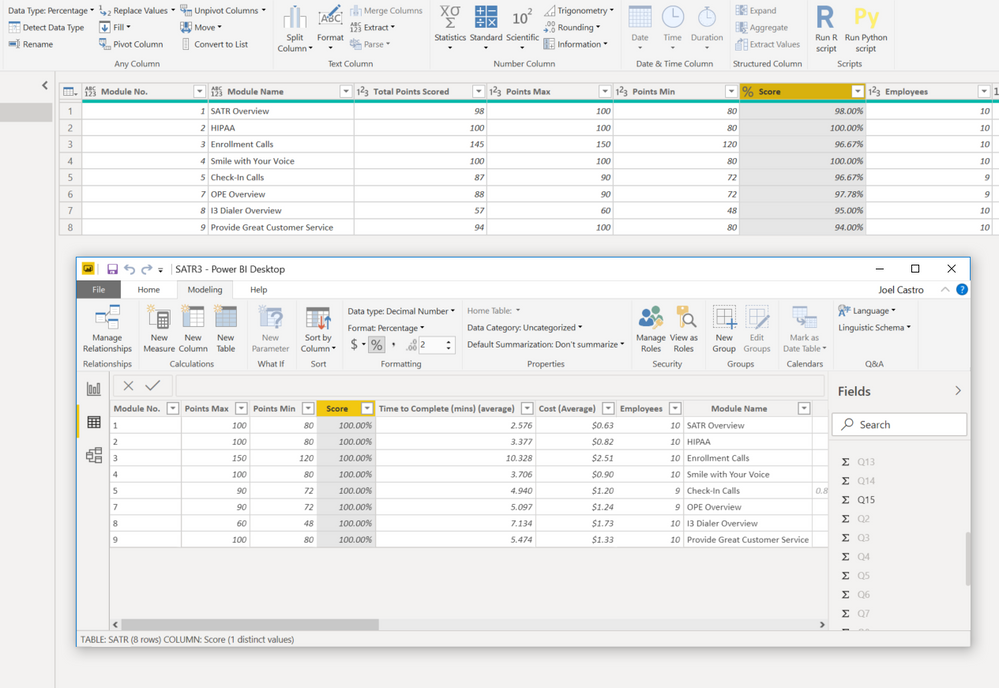
I have a % score column in my query editor and feeding into visual as expected. However, when I go to my data table, the same column does not have the same numbers? Do we know what causes this? I'm sure I have some type of formatting but tried to change and nothing. See screen shot
Solved! Go to Solution.
Hi @jcastr02 ,
Have you solved the problem?
If you have solved, please always accept the replies making sense as solution to your question so that people who may have the same question can get the solution directly.
If you still need help, please feel free to ask.
Best Regards,
Cherry
Hi @jcastr02 ,
Have you solved the problem?
If you have solved, please always accept the replies making sense as solution to your question so that people who may have the same question can get the solution directly.
If you still need help, please feel free to ask.
Best Regards,
Cherry
Thank you, yes once I downloaded the 64 bit, this resolved the issue!
Hi @jcastr02 ,
By my test with the latest version of power bi desktop, I cannot reproduce your issue.
Please check if you have installed the latest version of power bi desktop (2.71.5523.941) firstly.
You could have a test with my attachment.
If you still need help, please share a data sample which could reproduce the issue so that we could help further on it.
Best Regards,
Cherry
Check out the April 2026 Power BI update to learn about new features.
Sign up to receive a private message when registration opens and key events begin.
If you have recently started exploring Fabric, we'd love to hear how it's going. Your feedback can help with product improvements.