cancel
Showing results for 
Search instead for 
Did you mean: 

Did you hear? There's a new SQL AI Developer certification (DP-800). Start preparing now and be one of the first to get certified. Register now

Reply
IAM
Helper III
Helper III

Next scheduled refresh time

Hi all,


Where do I reference to when I want to show the next scheduled refresh time in my dashboard?


Is there a way to also see if the last refresh had any issues?

1 ACCEPTED SOLUTION
Anonymous
Not applicable

Hi @IAM ,


1.To my knowledge, there is no direct methods to get the next refresh time in Power BI . So I agree with @tackytechtom that you need to use Rest API to do such thing.


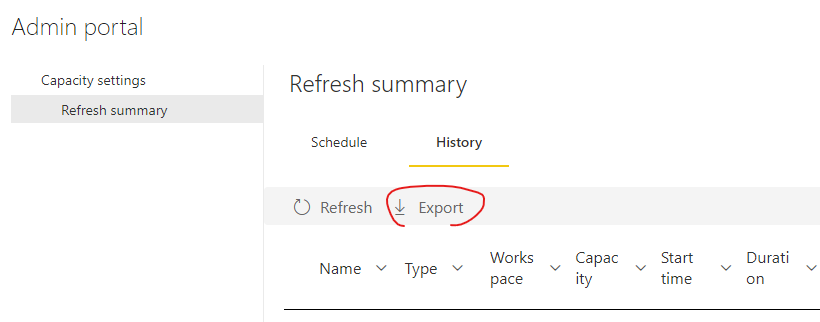
2. For refresh details, If you are a Power BI Admin, you can click the gear icon in the upper right corner of the service page and select the "Admin Portal" option. Find the Refresh summary menu, click on the History tab, and then click on "Export" to download and refresh the history.

Eyelyn9_0-1659523724762.png


Best Regards,
Eyelyn Qin
If this post helps, then please consider Accept it as the solution to help the other members find it more quickly.

View solution in original post

4 REPLIES 4
tackytechtom
Most Valuable Professional

Hi y'all,


Just wanted drop this one here, where I wrote a blog article on how to expose the next schedule refresh date/time in a Power BI report. It uses the get-refresh-schedule REST API to load in the schedule data and calculates the next scheduled refresh with a measure:


https://www.tackytech.blog/how-to-get-the-next-scheduled-refresh-date-into-your-power-bi-report/


Hope this helps 🙂


/Tom
https://www.tackytech.blog/
https://www.instagram.com/tackytechtom/


Did I answer your question➡️ Please, mark my post as a solution ✔️

Also happily accepting Kudos 🙂

Feel free to connect with me on LinkedIn! linkedIn

#proudtobeasuperuser 

Anonymous
Not applicable

Hi @IAM ,


1.To my knowledge, there is no direct methods to get the next refresh time in Power BI . So I agree with @tackytechtom that you need to use Rest API to do such thing.


2. For refresh details, If you are a Power BI Admin, you can click the gear icon in the upper right corner of the service page and select the "Admin Portal" option. Find the Refresh summary menu, click on the History tab, and then click on "Export" to download and refresh the history.

Eyelyn9_0-1659523724762.png


Best Regards,
Eyelyn Qin
If this post helps, then please consider Accept it as the solution to help the other members find it more quickly.

IAM
Helper III
Helper III

Is there a more easy way? Because with this I need to use the powershell right?

tackytechtom
Most Valuable Professional

Hi @IAM ,


You might be able to calculate the next schedule refresh with this API:

Datasets - Get Refresh Schedule - REST API (Power BI Power BI REST APIs) | Microsoft Docs


To get information about recent refreshes, I would probably use this one:

Datasets - Get Refresh History - REST API (Power BI Power BI REST APIs) | Microsoft Docs


Let me know if this helps 🙂


/Tom
https://www.tackytech.blog/
https://www.instagram.com/tackytechtom/


Did I answer your question➡️ Please, mark my post as a solution ✔️

Also happily accepting Kudos 🙂

Feel free to connect with me on LinkedIn! linkedIn

#proudtobeasuperuser 

Helpful resources

Announcements
April Power BI Update Carousel

Power BI Monthly Update - April 2026

Check out the April 2026 Power BI update to learn about new features.

Fabric SQL PBI Data Days

Data Days 2026 coming soon!

Sign up to receive a private message when registration opens and key events begin.

New to Fabric survey Carousel

New to Fabric Survey

If you have recently started exploring Fabric, we'd love to hear how it's going. Your feedback can help with product improvements.

Power BI DataViz World Championships carousel

Power BI DataViz World Championships - June 2026

A new Power BI DataViz World Championship is coming this June! Don't miss out on submitting your entry.

Top Solution Authors