cancel
Showing results for 
Search instead for 
Did you mean: 

The Power BI Data Visualization World Championships is back! Get ahead of the game and start preparing now! Learn more

Reply
dmm3344
New Member

Nested table has additional columns

I am having a strange issue when I am collating multiple excel sheets by power query.


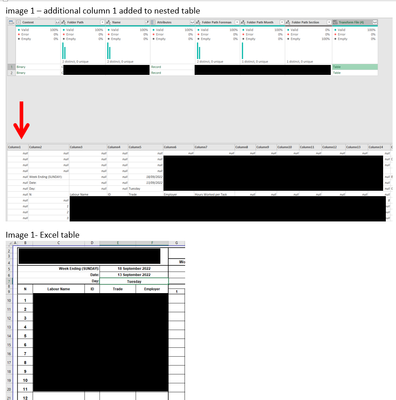
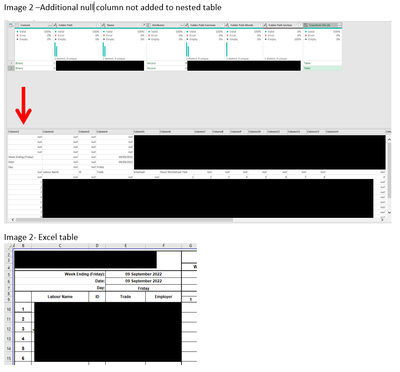
The excel sheets are the same formats however in the nested tables some of the imported tables are removing the first column and keeping this first column for other sheets and I cant work out why (images attached)


When i expand the tables this is causing some of the columns to be staggered so they dont line up.


1. any idea what is causing this

2. whats the best way to overcome this issue to ensure when i i expand tables all the columns are correctly lined up


images below

image 1- null column included.PNG image 2- null column not included.PNG


1 REPLY 1
jbwtp
Memorable Member
Memorable Member

Hi @dmm3344,


I think you need to check the import function that PBI created for you to suck in the data from the files.

The answer should probably sit somewhere around the settings for the step where the tab data are getting imported, somethering like Content[Kind=Table, Item = MyTab]. You may need to play with this one to see if this can be set to import the entire sheet, rather than a range.


Cheers,

John

Helpful resources

Announcements
Power BI DataViz World Championships

Power BI Dataviz World Championships

The Power BI Data Visualization World Championships is back! Get ahead of the game and start preparing now!

December 2025 Power BI Update Carousel

Power BI Monthly Update - December 2025

Check out the December 2025 Power BI Holiday Recap!

FabCon Atlanta 2026 carousel

FabCon Atlanta 2026

Join us at FabCon Atlanta, March 16-20, for the ultimate Fabric, Power BI, AI and SQL community-led event. Save $200 with code FABCOMM.

Top Solution Authors