We've captured the moments from FabCon & SQLCon that everyone is talking about, and we are bringing them to the community, live and on-demand. Starts on April 14th. Register now
I am having a strange issue when I am collating multiple excel sheets by power query.
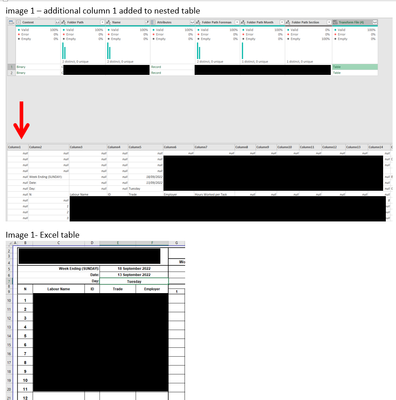
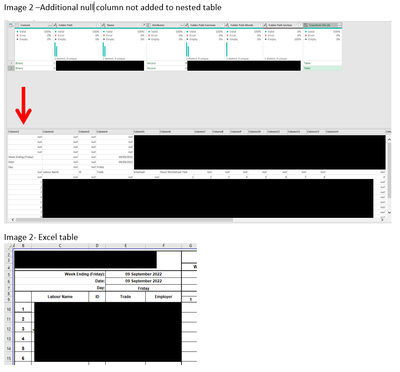
The excel sheets are the same formats however in the nested tables some of the imported tables are removing the first column and keeping this first column for other sheets and I cant work out why (images attached)
When i expand the tables this is causing some of the columns to be staggered so they dont line up.
1. any idea what is causing this
2. whats the best way to overcome this issue to ensure when i i expand tables all the columns are correctly lined up
images below
Hi @dmm3344,
I think you need to check the import function that PBI created for you to suck in the data from the files.
The answer should probably sit somewhere around the settings for the step where the tab data are getting imported, somethering like Content[Kind=Table, Item = MyTab]. You may need to play with this one to see if this can be set to import the entire sheet, rather than a range.
Cheers,
John
If you have recently started exploring Fabric, we'd love to hear how it's going. Your feedback can help with product improvements.
A new Power BI DataViz World Championship is coming this June! Don't miss out on submitting your entry.
Share feedback directly with Fabric product managers, participate in targeted research studies and influence the Fabric roadmap.
| User | Count |
|---|---|
| 5 | |
| 3 | |
| 3 | |
| 2 | |
| 2 |
| User | Count |
|---|---|
| 10 | |
| 8 | |
| 7 | |
| 7 | |
| 5 |