This time we’re going bigger than ever. Fabric, Power BI, SQL, AI and more. We're covering it all. You won't want to miss it.
Learn moreDid you hear? There's a new SQL AI Developer certification (DP-800). Start preparing now and be one of the first to get certified. Register now
Hi all,
I'm trying to nest several if conditions. This is the context:
- Column1 [S_LocalExpertDecision]: It is a string and can take several values or be null. I want this field if it isn't null. Otherwise:
- Column2 [InnovationLevel]: It is a number from 0 to 10, or null. I convert this value to text according a rule (<5 or >=5). If it is null, I will consider the next column.
- Column3 [PS_Decision]: It's similar to Column1. I just use this field if the previous one are null. Just in case this is null, the result will be null.
Taking this into account, I have this code:
= if [S_LocalExpertDecision] = null then (if [InnovationLevel] = null then (if [PS_Decision] = null then null else if Text.Contains([PS_Decision], "Innovation") then "Innovation" else if Text.Contains([PS_Decision], "Continuous") then "Continuous Improvement" else if Text.Contains([PS_Decision], "Dispose") then "Discarded" else null) else if [InnovationLevel] > 5 then "Innovation" else if [InnovationLevel] <= 5 then "Continuous Improvement" else null) else if Text.Contains([S_LocalExpertDecision], "Innovation") then "Innovation" else if Text.Contains([S_LocalExpertDecision], "Continuous") then "Continuous Improvement" else if Text.Contains([S_LocalExpertDecision], "Dispose") then "Discarded" else null
When I apply this, the column doesn't work and show lots of null entries. Any suggestion?
Thank you in advance.
Best regards,
Fernando
Solved! Go to Solution.
Hi @Anonymous ,
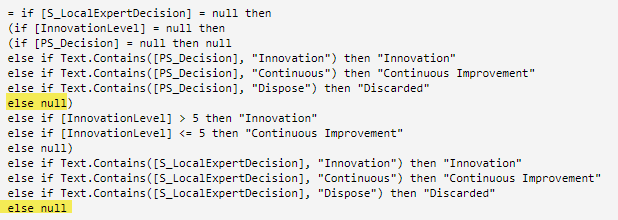
I think you have a couple of extra nulls in your formula:
extra nulls
With those nulls you won't see [PS_Decision] and [S_LocalExpertDecision] values when they doesn't meet your text criteria.
Try to run this code and let me know if you get any errors:
if
[S_LocalExpertDecision] = null
then
if
[InnovationLevel] = null
then
if
[PS_Decision] = null
then
null
else
if
Text.Contains([PS_Decision], "Innovation")
then
"Innovation"
else
if
Text.Contains([PS_Decision], "Continuous")
then
"Continuous Improvement"
else
if
Text.Contains([PS_Decision], "Dispose")
then
"Discarded"
else
[PS_Decision]
else
if
[InnovationLevel] > 5
then
"Innovation"
else
"Continuous Improvement"
else
if
Text.Contains([S_LocalExpertDecision], "Innovation")
then
"Innovation"
else
if
Text.Contains([S_LocalExpertDecision], "Continuous")
then
"Continuous Improvement"
else
if
Text.Contains([S_LocalExpertDecision], "Dispose")
then
"Discarded"
else
[S_LocalExpertDecision]Any question , please let me know.
Regards,
Gian Carlo Poggi
Hi @Anonymous ,
Have you solved the problem?
If you have solved, please always accept the replies making sense as solution to your question so that people who may have the same question can get the solution directly.
If you still need help, please share the data sample and your desired output so that we could help further on it.
Best Regards,
Cherry
Hi @Anonymous ,
I think you have a couple of extra nulls in your formula:
extra nulls
With those nulls you won't see [PS_Decision] and [S_LocalExpertDecision] values when they doesn't meet your text criteria.
Try to run this code and let me know if you get any errors:
if
[S_LocalExpertDecision] = null
then
if
[InnovationLevel] = null
then
if
[PS_Decision] = null
then
null
else
if
Text.Contains([PS_Decision], "Innovation")
then
"Innovation"
else
if
Text.Contains([PS_Decision], "Continuous")
then
"Continuous Improvement"
else
if
Text.Contains([PS_Decision], "Dispose")
then
"Discarded"
else
[PS_Decision]
else
if
[InnovationLevel] > 5
then
"Innovation"
else
"Continuous Improvement"
else
if
Text.Contains([S_LocalExpertDecision], "Innovation")
then
"Innovation"
else
if
Text.Contains([S_LocalExpertDecision], "Continuous")
then
"Continuous Improvement"
else
if
Text.Contains([S_LocalExpertDecision], "Dispose")
then
"Discarded"
else
[S_LocalExpertDecision]Any question , please let me know.
Regards,
Gian Carlo Poggi
Check out the April 2026 Power BI update to learn about new features.
Sign up to receive a private message when registration opens and key events begin.
If you have recently started exploring Fabric, we'd love to hear how it's going. Your feedback can help with product improvements.
| User | Count |
|---|---|
| 7 | |
| 5 | |
| 4 | |
| 3 | |
| 3 |