
cancel
Showing results for 
Search instead for 
Did you mean: 

July 7 - July 17 | Round 2 of the Power BI Dataviz World Championships. Don't miss your chance! Learn more

Reply
Hoschi
New Member

Multiple transformations on a table not yet expanded

Hello all,


I have any number of Excelfiles I grab from a Share Point folder. These are filtered down to filename and [table].

Hoschi_0-1662541230538.png

Before I can combine them, I need to a) Skip rows and b) Promote headers for each Table

I can do it for any single step, but I'm stuck at combining these steps (marked -->) in one single transform.

I think I only miss some code formatting rules, so please be kind with me 🙂


Thank you
Hoschi

#"Expanded Excel_File.Data" =
        Table.ExpandTableColumn(
            Table.TransformColumns(
                #"Source",
                {
                    {
                    "Excel_File.Data",
-->                    each Table.Skip(_,10),
-->                    each Table.PromoteHeaders(_, [PromoteAllScalars=true])
                    }
                }
            ),    
            "Excel_File.Data",
             {"Column1", "Column2", "Column3", "Column4"},
             {"Excel_File.Data.Column1", "Excel_File.Data.Column2", "Excel_File.Data.Column3", "Excel_File.Data.Column4"}
        )


1 ACCEPTED SOLUTION
v-jingzhang
Community Support
Community Support

Hi @Hoschi


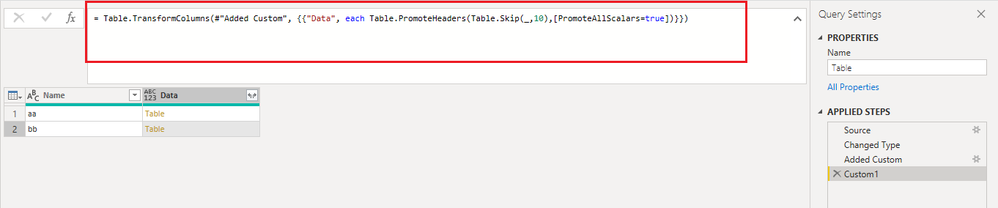
You can add a step with below code to transform the table column. Then expand it. 

= Table.TransformColumns(#"previous step name", {{"Data", each Table.PromoteHeaders(Table.Skip(_,10),[PromoteAllScalars=true])}})

vjingzhang_0-1662618829277.png


Best Regards,
Community Support Team _ Jing
If this post helps, please Accept it as Solution to help other members find it.

View solution in original post

2 REPLIES 2
v-jingzhang
Community Support
Community Support

Hi @Hoschi


You can add a step with below code to transform the table column. Then expand it. 

= Table.TransformColumns(#"previous step name", {{"Data", each Table.PromoteHeaders(Table.Skip(_,10),[PromoteAllScalars=true])}})

vjingzhang_0-1662618829277.png


Best Regards,
Community Support Team _ Jing
If this post helps, please Accept it as Solution to help other members find it.

Hello @v-jingzhang

Thank you very much. I promise to use KISS more often in the future.


Best regards

Hoschi

Helpful resources

Announcements
FabCon and SQLCon Barcelona 2026

FabCon & SQLCon – Barcelona 2026

Join us in Barcelona for FabCon and SQLCon, the Fabric, Power BI, SQL, and AI community event. Save €200 with code FABCMTY200.

60 days of Data Days Carousel

Data Days 2026

Join Fabric Data Days 2026: 60 days of free live/on-demand sessions, challenges, study groups, and certification opportunities.

Power BI DataViz World Championships carousel

Power BI DataViz World Championships - June 2026

A new Power BI DataViz World Championship is coming this June! Don't miss out on submitting your entry.