
Join us at FabCon Atlanta from March 16 - 20, 2026, for the ultimate Fabric, Power BI, AI and SQL community-led event. Save $200 with code FABCOMM.
Register now!Learn from the best! Meet the four finalists headed to the FINALS of the Power BI Dataviz World Championships! Register now
Hello all,
I have any number of Excelfiles I grab from a Share Point folder. These are filtered down to filename and [table].
Before I can combine them, I need to a) Skip rows and b) Promote headers for each Table
I can do it for any single step, but I'm stuck at combining these steps (marked -->) in one single transform.
I think I only miss some code formatting rules, so please be kind with me 🙂
Thank you
Hoschi
#"Expanded Excel_File.Data" =
Table.ExpandTableColumn(
Table.TransformColumns(
#"Source",
{
{
"Excel_File.Data",
--> each Table.Skip(_,10),
--> each Table.PromoteHeaders(_, [PromoteAllScalars=true])
}
}
),
"Excel_File.Data",
{"Column1", "Column2", "Column3", "Column4"},
{"Excel_File.Data.Column1", "Excel_File.Data.Column2", "Excel_File.Data.Column3", "Excel_File.Data.Column4"}
)
Solved! Go to Solution.
Hi @Hoschi
You can add a step with below code to transform the table column. Then expand it.
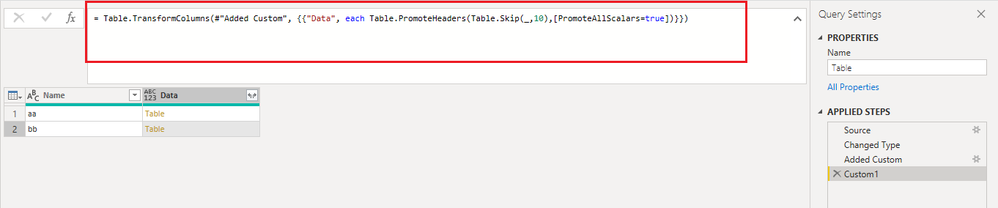
= Table.TransformColumns(#"previous step name", {{"Data", each Table.PromoteHeaders(Table.Skip(_,10),[PromoteAllScalars=true])}})
Best Regards,
Community Support Team _ Jing
If this post helps, please Accept it as Solution to help other members find it.
Hi @Hoschi
You can add a step with below code to transform the table column. Then expand it.
= Table.TransformColumns(#"previous step name", {{"Data", each Table.PromoteHeaders(Table.Skip(_,10),[PromoteAllScalars=true])}})
Best Regards,
Community Support Team _ Jing
If this post helps, please Accept it as Solution to help other members find it.
Hello @v-jingzhang
Thank you very much. I promise to use KISS more often in the future.
Best regards
Hoschi
Share feedback directly with Fabric product managers, participate in targeted research studies and influence the Fabric roadmap.
Check out the February 2026 Power BI update to learn about new features.
| User | Count |
|---|---|
| 16 | |
| 12 | |
| 9 | |
| 7 | |
| 6 |