Don't miss your chance to take the Fabric Data Engineer (DP-700) exam on us!
Learn moreWe've captured the moments from FabCon & SQLCon that everyone is talking about, and we are bringing them to the community, live and on-demand. Starts on April 14th. Register now
Hi,
I using Power BI to show the results of our Insightly data.
In Insightly I have projects for each customer, and under each project include their own tasks.
Now I'm trying to show the User, Project, and Task, Status in Power BI, but the table projects do not include the tasks... and the table tasks... do not include the projects. May I stablish a relation? is there any way to do that?
Please help, thanks,
Albert
Is there a way to get my Insightly data into Power BI Desktop on a windows PC?
It was really easy with the Power BI Online, but there is less functionality and I don't think your can transfer from Power BI Online to Power BI Desktop. I don't want to put too many hours into something that I may wish to 'upgrade' to Power BI Desktop later on.
Power BI Desktop doesn't offer a connector to Inisghtly's API yet. If you like, please go submit an idea here to help us prioritize adding that: https://ideas.powerbi.com/forums/265200-power-bi
Hi @Padelman,
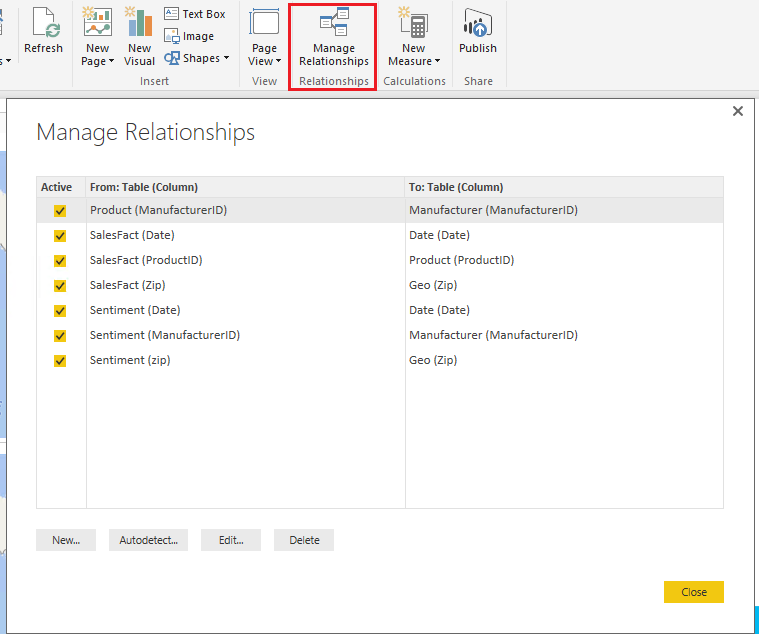
When you import projects table and tasks table into Power BI Desktop, it can autodetect the relationship and we can also create and manage relationship manually between those two tables like below:
Reference:
Create and manage relationships in Power BI Desktop
Best Regards,
Qiuyun Yu
Dear all,
Thanks for your answer, but I'm using Power BI on a Mac... so just web based. Any alternative solution to Power BI Desktop?
Hi @Padelman,
In my original reply, the solution is for Power BI Desktop. In Power BI Service, we can't do much for data model.
As the Power BI desktop can only run on the Windows system currently, you aren't able to mange the relationship on MAC. To workaround the issue, you can use one computer which supports Power BI Desktop to create relationships, then publish the report to Power BI Service. On MAC, you can logon the Power BI Service to view the report.
Best Regards,
Qiuyun Yu
If you have recently started exploring Fabric, we'd love to hear how it's going. Your feedback can help with product improvements.
A new Power BI DataViz World Championship is coming this June! Don't miss out on submitting your entry.
Share feedback directly with Fabric product managers, participate in targeted research studies and influence the Fabric roadmap.
| User | Count |
|---|---|
| 5 | |
| 4 | |
| 3 | |
| 3 | |
| 2 |
| User | Count |
|---|---|
| 8 | |
| 8 | |
| 6 | |
| 6 | |
| 5 |