cancel
Showing results for 
Search instead for 
Did you mean: 

The Power BI Data Visualization World Championships is back! Get ahead of the game and start preparing now! Learn more

Reply
Marco_Iac
Frequent Visitor

Multiple choice with data import parameter

Hi,


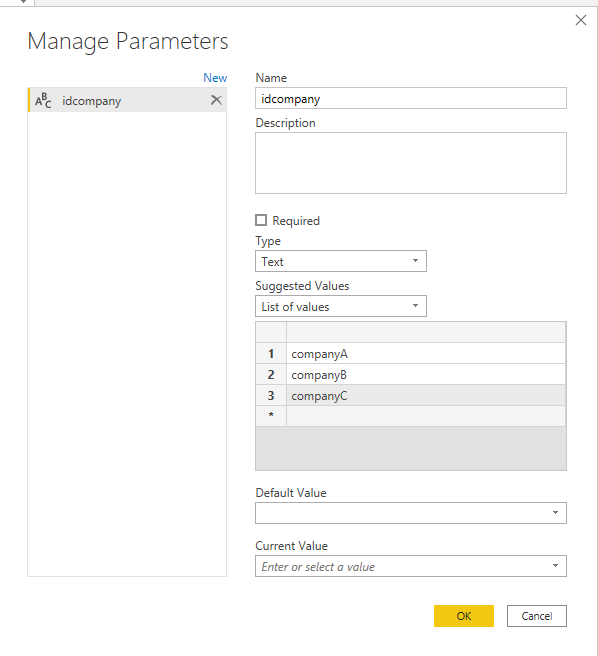
i create the  parameter "idcompany" to filter data before import by the company ID.


a1.PNG


I have company A, B and C.

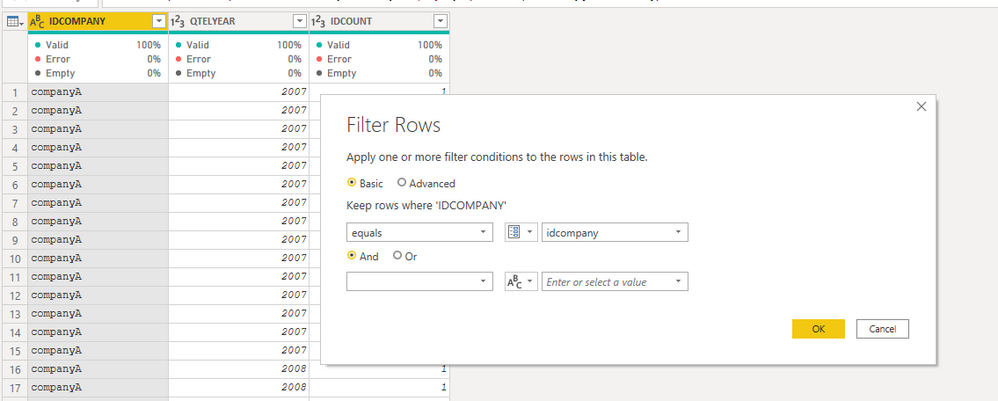
I apply the parametr to a table column to filter data befor importing:


a2.PNG


Through the parameter I can filter by single company before importing the data.

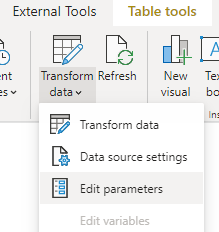
The problem is that whe i manage the parameter to limit the data to import i am able to filter from a drop list only one company at time for example import data of only company A or import data of only company B.


a3.PNG


Is there a way to create a parameter that allows to choice if import data from only one company or from all company? A sort of multi check drop list


Thanks

4 REPLIES 4
Marco_Iac
Frequent Visitor

Thanks,

i tried it but works only with certain type of direct query connection

mahoneypat
Microsoft Employee
Microsoft Employee

In #2, your users would enter a list of companies into the text parameter, not choose from a list.


Company A, Company C, Company F   for example.  


However, this article by Chris Webb shows that doing a multi-select parameter is possible with the new Dynamic M parameters feature (I haven't used it yet, but it looks straight forward).

Chris Webb's BI Blog: Handling Multi-select In Power BI Dynamic M Parameters Chris Webb's BI Blog (c...


Regards,

Pat


Did I answer your question? Mark my post as a solution! Kudos are also appreciated!

To learn more about Power BI, follow me on Twitter or subscribe on YouTube.


@mahoneypa HoosierBI on YouTube


mahoneypat
Microsoft Employee
Microsoft Employee

Two ideas to try


1. Make multiple parameters and use some "or" logic in your Company filter step prior to getting the data


2. Enter the companies as a text string separated by a delimiter in a single parameter, then use Text.Split() to create a list from that.  You can then use List.Contains(parameterlist, ...  to keep only the companies in the list.


Regards,

Pat


Did I answer your question? Mark my post as a solution! Kudos are also appreciated!

To learn more about Power BI, follow me on Twitter or subscribe on YouTube.


@mahoneypa HoosierBI on YouTube


Thanks for the tips, i have 100 company to pass in the parameter so solution 1 is hard to implement and use; on a list of few companys it work well.


I don't  understand well solution 2, can you please give me an example?


at the and i need to save the model as a template, so that end user will able to select from the drop list which company's data load (data of only one company or data of all company)

Thank

Helpful resources

Announcements
Power BI DataViz World Championships

Power BI Dataviz World Championships

The Power BI Data Visualization World Championships is back! Get ahead of the game and start preparing now!

December 2025 Power BI Update Carousel

Power BI Monthly Update - December 2025

Check out the December 2025 Power BI Holiday Recap!

FabCon Atlanta 2026 carousel

FabCon Atlanta 2026

Join us at FabCon Atlanta, March 16-20, for the ultimate Fabric, Power BI, AI and SQL community-led event. Save $200 with code FABCOMM.

Top Solution Authors