This time we’re going bigger than ever. Fabric, Power BI, SQL, AI and more. We're covering it all. You won't want to miss it.
Learn moreLevel up your Power BI skills this month - build one visual each week and tell better stories with data! Get started
Hello,
While trying to figure out how to use Power BI, I used different files in different locations. On my third "practice," I ended up getting carried away and created my whole report.
However, I didn't think ahead that I'd be renaming a file, or moving it to a different location to make it so adding to the file as time goes on would make the most sense.
My question is ultimately:
If I rename my excel file (was: ABC renamed to: XYZ) and move it to a new location (was: on desktop moved to: Company share drive) is there anyway to salvage my report and allow it to continue to update/refresh so that I don't have to start from scratch?
Please ask if you need clarification.
Thank you!
Solved! Go to Solution.
Hi @Anonymous ,
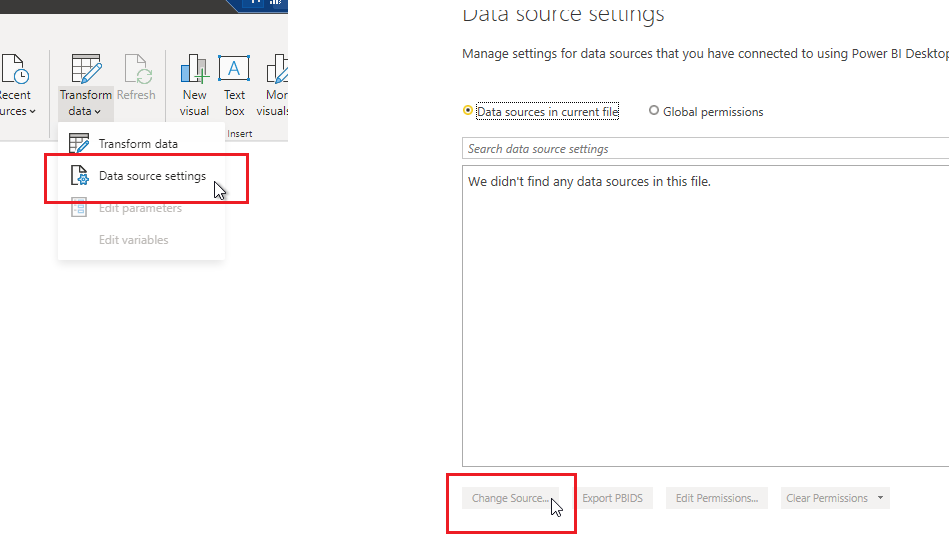
You can use data source settings and change your excel.
Hope this helps.
Hi @Anonymous ,
You can use data source settings and change your excel.
Hope this helps.
@mussaenda , I recently tried this with a report of my own. The Excel file was in sharepoint and had to be moved to a different location within sharepoint. When I changed the source, my report got "stuck" on "Evaluating" when I applied the changes. Do you happen to know if there is a fix, or if I possibly missed something?
Sorry if its a silly question, but I am totally new to BI.
Check out the April 2026 Power BI update to learn about new features.
Sign up to receive a private message when registration opens and key events begin.
If you have recently started exploring Fabric, we'd love to hear how it's going. Your feedback can help with product improvements.
| User | Count |
|---|---|
| 3 | |
| 2 | |
| 2 | |
| 2 | |
| 2 |