cancel
Showing results for 
Search instead for 
Did you mean: 

Vote for your favorite vizzies from the Power BI Dataviz World Championship submissions. Vote now!

Reply
TNewton
Regular Visitor

Minutes:Seconds conversion

Hello all!


I am very new to Power BI and trying to convert our reports from Excel to Power BI. My issue is that our reports export measure time in duration, where the time format is for example 1436:50 (1436 minutes and 50 seconds). I know how to work this in Excel, but anyone know how to convert this data into the proper HH:MM:SS format (23:56:50)? 


As always thanks in advance!

3 REPLIES 3
TNewton
Regular Visitor

Thank you to you both! I have another project I have to complete so I have put this one on hold, but wanted to express my graditude for all your time on this. I will try the above out and check back. 


Again thank you!

ppm1
Solution Sage
Solution Sage

The best way to handle durations is to convert it to a decimal (in days), load your table, write your DAX measures to do aggregation, and then format it at the end. You can do the first step with a custom column in the query editor with this expression.


= Number.FromText(Text.BeforeDelimiter([Duration], ":"))/24/60 + Number.FromText(Text.AfterDelimiter([Duration], ":"))/24/60/60


Then use the approach in this article to FORMAT as a time value however you like.

Calculate and Format Durations in DAX – Hoosier BI


Pat


Microsoft Employee
djurecicK2
Super User
Super User

Hi @TNewton 

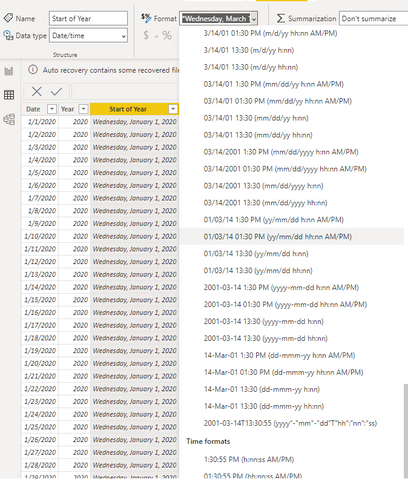
 Here is one way to do this. First, select data view 

djurecicK2_2-1669752192203.png


Then select the column you'd like to change and click Format in the ribbon- you will see a long list of formats including time formats.

djurecicK2_3-1669752267900.png

Please consider accepting as solution if this answers the question- thanks!


Helpful resources

Announcements
Power BI DataViz World Championships

Power BI Dataviz World Championships

Vote for your favorite vizzies from the Power BI World Championship submissions!

Sticker Challenge 2026 Carousel

Join our Community Sticker Challenge 2026

If you love stickers, then you will definitely want to check out our Community Sticker Challenge!

January Power BI Update Carousel

Power BI Monthly Update - January 2026

Check out the January 2026 Power BI update to learn about new features.

FabCon Atlanta 2026 carousel

FabCon Atlanta 2026

Join us at FabCon Atlanta, March 16-20, for the ultimate Fabric, Power BI, AI and SQL community-led event. Save $200 with code FABCOMM.