
Don't miss your chance to take the Fabric Data Engineer (DP-600) exam for FREE! Find out how by attending the DP-600 session on April 23rd (pacific time), live or on-demand.
Learn moreNext up in the FabCon + SQLCon recap series: The roadmap for Microsoft SQL and Maximizing Developer experiences in Fabric. All sessions are available on-demand after the live show. Register now
Hi all,
Brand new to Power BI so bear with me.
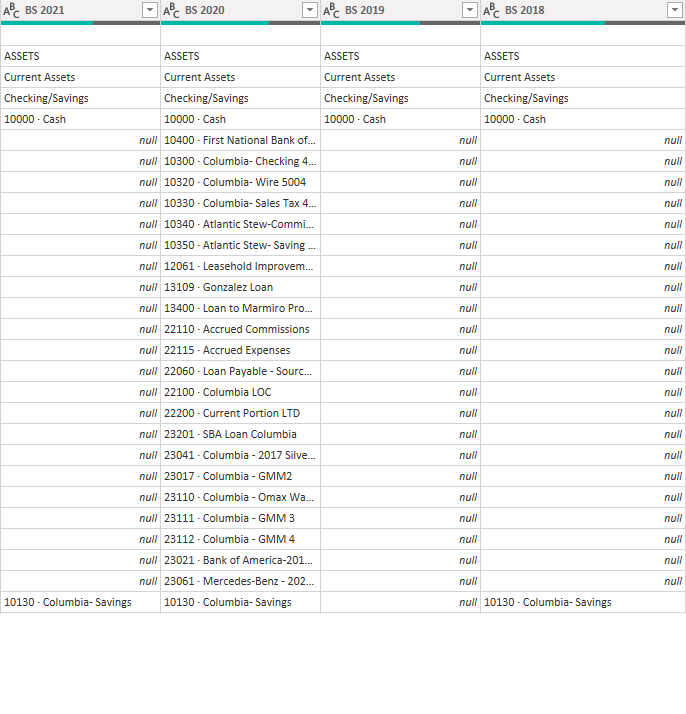
I just merged 4 queries into one generating quite a bit of data.
These were merged based on the 1st column in each query.
What I am looking to do is merge these 4 columns into one, but my issue is with the null values. Each column is a different year and each year has slightly different data in each row. How can I go about merging all 4 columns and replacing the null values with the missing data from respective columns?
Solved! Go to Solution.
Hi @Anonymous ,
Not sure if this fully meets your requirements (it should be noted that in your example [BS 2020] actually holds a complete dataset), but you could try adding a new column with the following calculation:
List.Max({[BS 2018], [BS 2019], [BS 2020], [BS 2021]})
Obviously this isn't particularly dynamic and will break if/when you change the years but, for a one-off operation, should work ok.
Pete
Proud to be a Datanaut!
Hi @Anonymous ,
Not sure if this fully meets your requirements (it should be noted that in your example [BS 2020] actually holds a complete dataset), but you could try adding a new column with the following calculation:
List.Max({[BS 2018], [BS 2019], [BS 2020], [BS 2021]})
Obviously this isn't particularly dynamic and will break if/when you change the years but, for a one-off operation, should work ok.
Pete
Proud to be a Datanaut!
List.Max(Record.ToList(_))
| Thanks to the great efforts by MS engineers to simplify syntax of DAX! Most beginners are SUCCESSFULLY MISLED to think that they could easily master DAX; but it turns out that the intricacy of the most frequently used RANKX() is still way beyond their comprehension! |
DAX is simple, but NOT EASY! |
If you have recently started exploring Fabric, we'd love to hear how it's going. Your feedback can help with product improvements.
A new Power BI DataViz World Championship is coming this June! Don't miss out on submitting your entry.
Share feedback directly with Fabric product managers, participate in targeted research studies and influence the Fabric roadmap.
| User | Count |
|---|---|
| 5 | |
| 3 | |
| 3 | |
| 3 | |
| 2 |