
Join us at FabCon Atlanta from March 16 - 20, 2026, for the ultimate Fabric, Power BI, AI and SQL community-led event. Save $200 with code FABCOMM.
Register now!Get Fabric certified for FREE! Don't miss your chance! Learn more
Hi all,
Brand new to Power BI so bear with me.
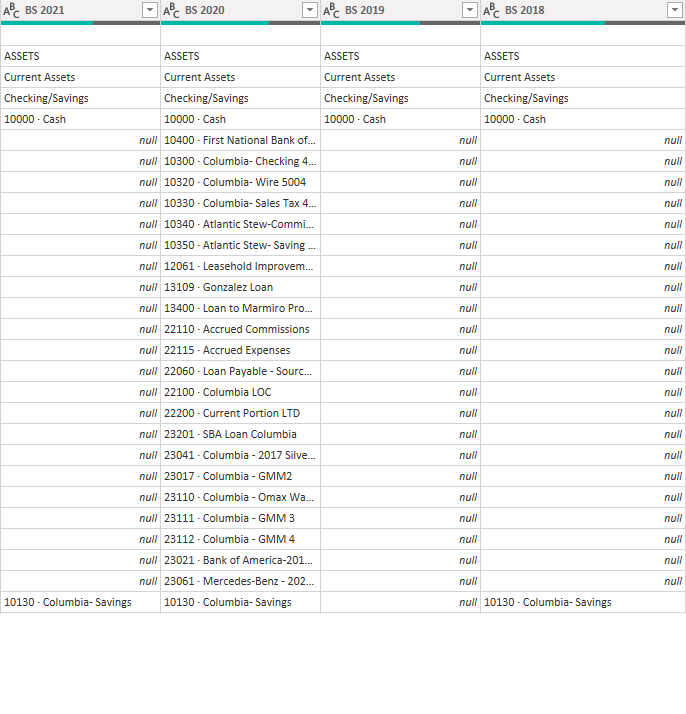
I just merged 4 queries into one generating quite a bit of data.
These were merged based on the 1st column in each query.
What I am looking to do is merge these 4 columns into one, but my issue is with the null values. Each column is a different year and each year has slightly different data in each row. How can I go about merging all 4 columns and replacing the null values with the missing data from respective columns?
Solved! Go to Solution.
Hi @Anonymous ,
Not sure if this fully meets your requirements (it should be noted that in your example [BS 2020] actually holds a complete dataset), but you could try adding a new column with the following calculation:
List.Max({[BS 2018], [BS 2019], [BS 2020], [BS 2021]})
Obviously this isn't particularly dynamic and will break if/when you change the years but, for a one-off operation, should work ok.
Pete
Proud to be a Datanaut!
Hi @Anonymous ,
Not sure if this fully meets your requirements (it should be noted that in your example [BS 2020] actually holds a complete dataset), but you could try adding a new column with the following calculation:
List.Max({[BS 2018], [BS 2019], [BS 2020], [BS 2021]})
Obviously this isn't particularly dynamic and will break if/when you change the years but, for a one-off operation, should work ok.
Pete
Proud to be a Datanaut!
List.Max(Record.ToList(_))
| Thanks to the great efforts by MS engineers to simplify syntax of DAX! Most beginners are SUCCESSFULLY MISLED to think that they could easily master DAX; but it turns out that the intricacy of the most frequently used RANKX() is still way beyond their comprehension! |
DAX is simple, but NOT EASY! |
Share feedback directly with Fabric product managers, participate in targeted research studies and influence the Fabric roadmap.
Check out the January 2026 Power BI update to learn about new features.
| User | Count |
|---|---|
| 12 | |
| 11 | |
| 10 | |
| 6 | |
| 5 |