cancel
Showing results for 
Search instead for 
Did you mean: 

Try your skills in the Power BI Dataviz World Championship! Round one ends June 26. Join now

Reply
TChagwedera
Regular Visitor

Merging 2 rows

 Good morning 

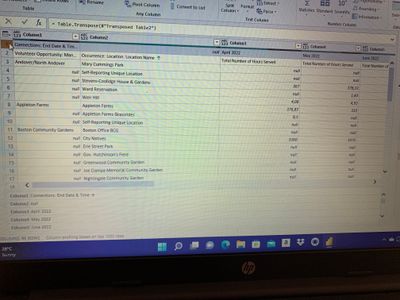
I'm new to Power BI and working on some project to do reports and dashboards. I'm stuck with two rows that I wish to merge so that it becomes my header. How do I do that? I want to merge first row and the Second one

image.jpg

1 ACCEPTED SOLUTION

@TChagwedera 


let
    Source = Table.FromRows(Json.Document(Binary.Decompress(Binary.FromText("hY49C4MwEIb/ypHZwVo/iltpCx2qDpUu1iGNVxA0kZgU/PfNRaFjISF37/NwuaZhJyUlCtMrOedwkR2cuUF42jCMUqj7EVnA3DlOuh8gCqPINQVf1rINGvZQg5UGUUM1TUobK3uz5FBw6cxKCKtRCszhpgSnb34VlNyPr5XhA5R2fLkh6g1XZfUMd9Qf7P5h2mDnpL279K470ZKx74hQQjzZvNgnxNPNS3xCPNu81CfED5uXsbb9Ag==", BinaryEncoding.Base64), Compression.Deflate)), let _t = ((type nullable text) meta [Serialized.Text = true]) in type table [Column1 = _t, Column2 = _t, Column3 = _t, Column4 = _t]),
    #"Changed Type" = Table.TransformColumnTypes(Source,{{"Column1", type text}, {"Column2", type text}, {"Column3", type text}, {"Column4", type text}}),
    #"Transposed Table" = Table.Transpose(#"Changed Type"),
    #"Merged Columns" = Table.CombineColumns(#"Transposed Table",{"Column1", "Column2"},Combiner.CombineTextByDelimiter(" ", QuoteStyle.None),"Merged"),
    #"Transposed Table1" = Table.Transpose(#"Merged Columns"),
    #"Promoted Headers" = Table.PromoteHeaders(#"Transposed Table1", [PromoteAllScalars=true]),
    #"Changed Type1" = Table.TransformColumnTypes(#"Promoted Headers",{{"Connections: End Date & Time Volunteer Opportunity: Man", Int64.Type}, {" Occurence: Location: Location Name", Int64.Type}, {"April 2022 Total Number of Hours Served", Int64.Type}, {"May 2022 Total Number of Hours Served", Int64.Type}})
in
    #"Changed Type1"

In English:

  1. Transpose your table
  2. Select the first two columns and Merge
  3. Transpose your table


Follow on LinkedIn
@ me in replies or I'll lose your thread!!!
Instead of a Kudo, please vote for this idea
Become an expert!: Enterprise DNA
External Tools: MSHGQM
YouTube Channel!: Microsoft Hates Greg
Latest book!:
DAX For Humans

DAX is easy, CALCULATE makes DAX hard...

View solution in original post

5 REPLIES 5
Greg_Deckler
Community Champion
Community Champion

@TChagwedera So, what is the intended result that you want?


Follow on LinkedIn
@ me in replies or I'll lose your thread!!!
Instead of a Kudo, please vote for this idea
Become an expert!: Enterprise DNA
External Tools: MSHGQM
YouTube Channel!: Microsoft Hates Greg
Latest book!:
DAX For Humans

DAX is easy, CALCULATE makes DAX hard...

Hello Greg

thank you for your response.. so I wish to have the details in row 2 to be combined with the information in row 1. For example I want the years to be combined with that Total number served heading in row 2

@TChagwedera So just for the years columns or for all columns, in other words do you want:


Connections: End Date & Time... Volunteer Opportunity: Man..., Occurence: Location: Location Name, April 2022 Total Number of Hours Served, May 2022 Total Number of Hours Served


or:


Connections: End Date & Time..., null, April 2022 Total Number of Hours Served, May 2022 Total Number of Hours Served


or


Connections: End Date & Time..., Occurence: Location: Location Name, April 2022 Total Number of Hours Served, May 2022 Total Number of Hours Served


or


Connections: End Date & Time..., Occurence: Location: Location Name, Total Number of Hours Served April 2022, Total Number of Hours Served May 2022


or possibly 1 of the millions of potential permutations?


Follow on LinkedIn
@ me in replies or I'll lose your thread!!!
Instead of a Kudo, please vote for this idea
Become an expert!: Enterprise DNA
External Tools: MSHGQM
YouTube Channel!: Microsoft Hates Greg
Latest book!:
DAX For Humans

DAX is easy, CALCULATE makes DAX hard...

I would like to go with option 1 if it's possible or if you have any tips on how I can go about it please help

@TChagwedera 


let
    Source = Table.FromRows(Json.Document(Binary.Decompress(Binary.FromText("hY49C4MwEIb/ypHZwVo/iltpCx2qDpUu1iGNVxA0kZgU/PfNRaFjISF37/NwuaZhJyUlCtMrOedwkR2cuUF42jCMUqj7EVnA3DlOuh8gCqPINQVf1rINGvZQg5UGUUM1TUobK3uz5FBw6cxKCKtRCszhpgSnb34VlNyPr5XhA5R2fLkh6g1XZfUMd9Qf7P5h2mDnpL279K470ZKx74hQQjzZvNgnxNPNS3xCPNu81CfED5uXsbb9Ag==", BinaryEncoding.Base64), Compression.Deflate)), let _t = ((type nullable text) meta [Serialized.Text = true]) in type table [Column1 = _t, Column2 = _t, Column3 = _t, Column4 = _t]),
    #"Changed Type" = Table.TransformColumnTypes(Source,{{"Column1", type text}, {"Column2", type text}, {"Column3", type text}, {"Column4", type text}}),
    #"Transposed Table" = Table.Transpose(#"Changed Type"),
    #"Merged Columns" = Table.CombineColumns(#"Transposed Table",{"Column1", "Column2"},Combiner.CombineTextByDelimiter(" ", QuoteStyle.None),"Merged"),
    #"Transposed Table1" = Table.Transpose(#"Merged Columns"),
    #"Promoted Headers" = Table.PromoteHeaders(#"Transposed Table1", [PromoteAllScalars=true]),
    #"Changed Type1" = Table.TransformColumnTypes(#"Promoted Headers",{{"Connections: End Date & Time Volunteer Opportunity: Man", Int64.Type}, {" Occurence: Location: Location Name", Int64.Type}, {"April 2022 Total Number of Hours Served", Int64.Type}, {"May 2022 Total Number of Hours Served", Int64.Type}})
in
    #"Changed Type1"

In English:

  1. Transpose your table
  2. Select the first two columns and Merge
  3. Transpose your table


Follow on LinkedIn
@ me in replies or I'll lose your thread!!!
Instead of a Kudo, please vote for this idea
Become an expert!: Enterprise DNA
External Tools: MSHGQM
YouTube Channel!: Microsoft Hates Greg
Latest book!:
DAX For Humans

DAX is easy, CALCULATE makes DAX hard...

Helpful resources

Announcements
Fabric Data Days is here Carousel

Data Days 2026

Don't miss out on Data Days, June 15 through August 7. Learn Fabric, Power BI, SQL, AI and more.

May Power BI Update Carousel

Power BI Monthly Update - May 2026

Check out the May 2026 Power BI update to learn about new features.

Power BI DataViz World Championships carousel

Power BI DataViz World Championships - June 2026

A new Power BI DataViz World Championship is coming this June! Don't miss out on submitting your entry.