Don't miss your chance to take the Fabric Data Engineer (DP-600) exam for FREE! Find out how by attending the DP-600 session on April 23rd (pacific time), live or on-demand.
Learn moreNext up in the FabCon + SQLCon recap series: The roadmap for Microsoft SQL and Maximizing Developer experiences in Fabric. All sessions are available on-demand after the live show. Register now
Good morning
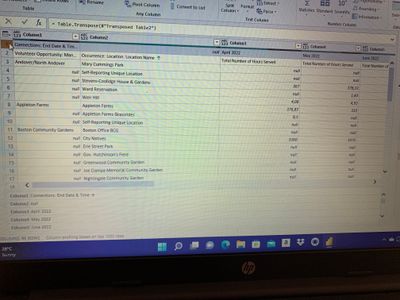
I'm new to Power BI and working on some project to do reports and dashboards. I'm stuck with two rows that I wish to merge so that it becomes my header. How do I do that? I want to merge first row and the Second one
Solved! Go to Solution.
let
Source = Table.FromRows(Json.Document(Binary.Decompress(Binary.FromText("hY49C4MwEIb/ypHZwVo/iltpCx2qDpUu1iGNVxA0kZgU/PfNRaFjISF37/NwuaZhJyUlCtMrOedwkR2cuUF42jCMUqj7EVnA3DlOuh8gCqPINQVf1rINGvZQg5UGUUM1TUobK3uz5FBw6cxKCKtRCszhpgSnb34VlNyPr5XhA5R2fLkh6g1XZfUMd9Qf7P5h2mDnpL279K470ZKx74hQQjzZvNgnxNPNS3xCPNu81CfED5uXsbb9Ag==", BinaryEncoding.Base64), Compression.Deflate)), let _t = ((type nullable text) meta [Serialized.Text = true]) in type table [Column1 = _t, Column2 = _t, Column3 = _t, Column4 = _t]),
#"Changed Type" = Table.TransformColumnTypes(Source,{{"Column1", type text}, {"Column2", type text}, {"Column3", type text}, {"Column4", type text}}),
#"Transposed Table" = Table.Transpose(#"Changed Type"),
#"Merged Columns" = Table.CombineColumns(#"Transposed Table",{"Column1", "Column2"},Combiner.CombineTextByDelimiter(" ", QuoteStyle.None),"Merged"),
#"Transposed Table1" = Table.Transpose(#"Merged Columns"),
#"Promoted Headers" = Table.PromoteHeaders(#"Transposed Table1", [PromoteAllScalars=true]),
#"Changed Type1" = Table.TransformColumnTypes(#"Promoted Headers",{{"Connections: End Date & Time Volunteer Opportunity: Man", Int64.Type}, {" Occurence: Location: Location Name", Int64.Type}, {"April 2022 Total Number of Hours Served", Int64.Type}, {"May 2022 Total Number of Hours Served", Int64.Type}})
in
#"Changed Type1"
In English:
@TChagwedera So, what is the intended result that you want?
Hello Greg
thank you for your response.. so I wish to have the details in row 2 to be combined with the information in row 1. For example I want the years to be combined with that Total number served heading in row 2
@TChagwedera So just for the years columns or for all columns, in other words do you want:
Connections: End Date & Time... Volunteer Opportunity: Man..., Occurence: Location: Location Name, April 2022 Total Number of Hours Served, May 2022 Total Number of Hours Served
or:
Connections: End Date & Time..., null, April 2022 Total Number of Hours Served, May 2022 Total Number of Hours Served
or
Connections: End Date & Time..., Occurence: Location: Location Name, April 2022 Total Number of Hours Served, May 2022 Total Number of Hours Served
or
Connections: End Date & Time..., Occurence: Location: Location Name, Total Number of Hours Served April 2022, Total Number of Hours Served May 2022
or possibly 1 of the millions of potential permutations?
I would like to go with option 1 if it's possible or if you have any tips on how I can go about it please help
let
Source = Table.FromRows(Json.Document(Binary.Decompress(Binary.FromText("hY49C4MwEIb/ypHZwVo/iltpCx2qDpUu1iGNVxA0kZgU/PfNRaFjISF37/NwuaZhJyUlCtMrOedwkR2cuUF42jCMUqj7EVnA3DlOuh8gCqPINQVf1rINGvZQg5UGUUM1TUobK3uz5FBw6cxKCKtRCszhpgSnb34VlNyPr5XhA5R2fLkh6g1XZfUMd9Qf7P5h2mDnpL279K470ZKx74hQQjzZvNgnxNPNS3xCPNu81CfED5uXsbb9Ag==", BinaryEncoding.Base64), Compression.Deflate)), let _t = ((type nullable text) meta [Serialized.Text = true]) in type table [Column1 = _t, Column2 = _t, Column3 = _t, Column4 = _t]),
#"Changed Type" = Table.TransformColumnTypes(Source,{{"Column1", type text}, {"Column2", type text}, {"Column3", type text}, {"Column4", type text}}),
#"Transposed Table" = Table.Transpose(#"Changed Type"),
#"Merged Columns" = Table.CombineColumns(#"Transposed Table",{"Column1", "Column2"},Combiner.CombineTextByDelimiter(" ", QuoteStyle.None),"Merged"),
#"Transposed Table1" = Table.Transpose(#"Merged Columns"),
#"Promoted Headers" = Table.PromoteHeaders(#"Transposed Table1", [PromoteAllScalars=true]),
#"Changed Type1" = Table.TransformColumnTypes(#"Promoted Headers",{{"Connections: End Date & Time Volunteer Opportunity: Man", Int64.Type}, {" Occurence: Location: Location Name", Int64.Type}, {"April 2022 Total Number of Hours Served", Int64.Type}, {"May 2022 Total Number of Hours Served", Int64.Type}})
in
#"Changed Type1"
In English:
If you have recently started exploring Fabric, we'd love to hear how it's going. Your feedback can help with product improvements.
A new Power BI DataViz World Championship is coming this June! Don't miss out on submitting your entry.
| User | Count |
|---|---|
| 5 | |
| 3 | |
| 3 | |
| 3 | |
| 2 |
| User | Count |
|---|---|
| 7 | |
| 5 | |
| 5 | |
| 5 | |
| 4 |