Get certified for free when you join Fabric Data Days 2026 and dive into Fabric, Power BI, SQL, AI, and other essential data skills.
Join nowData Days is here! Join us now for 60+ days of learning, challenges, and connection. Learn more
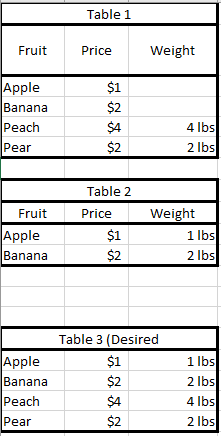
I have two queries that I'd like to merge together. They have the same columns. The problem is that 1 query has gaps in some of the data. Here is an example:
Would I be able to merge these queries to fill in the 0's from table 1? Is it possible to delete "Apple" and "Banana" from table 1 and do a Full Outer Row merge?
Thanks!
Solved! Go to Solution.
You can append three pieces together.
Sample query with Table1 and Table2 definitions embedded:
let
Table1 =
Table.FromRows(
{{"Apple", 1, null}, {"Banana", 2, null }, {"Orange", 1, null}, {"Peach", 4, 4}, {"Pear", 2, 2}},
type table [Fruit = text, Price = number, Weight = number]
),
Table2 =
Table.FromRows(
{{"Apple", 1, 1}, {"Banana", 2, 2 }, {"Watermelon", 2, 3}},
type table [Fruit = text, Price = number, Weight = number]
),
Appended = Table.Combine(
{
Table.NestedJoin(Table2, {"Fruit"}, Table.SelectRows(Table1, each [Weight] = null), {"Fruit"}, "Merge", JoinKind.Inner),
Table.NestedJoin(Table1, {"Fruit"}, Table2, {"Fruit"}, "Merge", JoinKind.LeftAnti),
Table.NestedJoin(Table2, {"Fruit"}, Table1, {"Fruit"}, "Merge", JoinKind.LeftAnti)
}),
#"Removed Columns" = Table.RemoveColumns(Appended,{"Merge"})
in
#"Removed Columns"
Hi, @RickWald
May I ask if your problem has been solved? Is the above post helpful to you?
The solution provided by @AlexisOlson above can work for you.
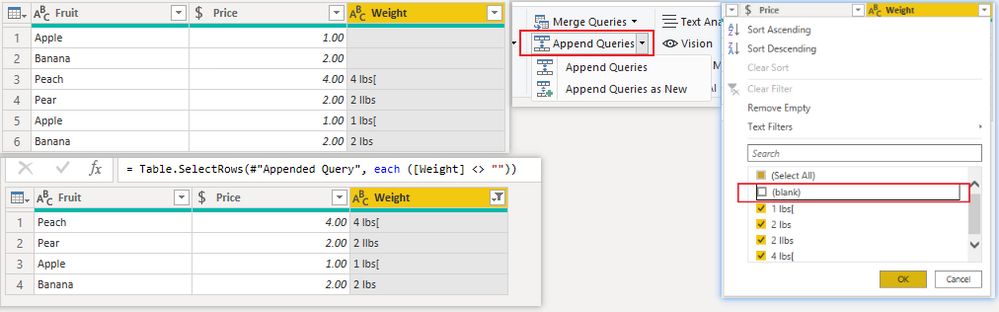
If all your blank items can find matching values in another table, then you can even more easily get the results by appending the data from the two tables and then filtering out the blank rows.
Result:
Best Regards,
Community Support Team _ Zeon Zheng
If this post helps, then please consider Accept it as the solution to help the other members find it more quickly.
You can append three pieces together.
Sample query with Table1 and Table2 definitions embedded:
let
Table1 =
Table.FromRows(
{{"Apple", 1, null}, {"Banana", 2, null }, {"Orange", 1, null}, {"Peach", 4, 4}, {"Pear", 2, 2}},
type table [Fruit = text, Price = number, Weight = number]
),
Table2 =
Table.FromRows(
{{"Apple", 1, 1}, {"Banana", 2, 2 }, {"Watermelon", 2, 3}},
type table [Fruit = text, Price = number, Weight = number]
),
Appended = Table.Combine(
{
Table.NestedJoin(Table2, {"Fruit"}, Table.SelectRows(Table1, each [Weight] = null), {"Fruit"}, "Merge", JoinKind.Inner),
Table.NestedJoin(Table1, {"Fruit"}, Table2, {"Fruit"}, "Merge", JoinKind.LeftAnti),
Table.NestedJoin(Table2, {"Fruit"}, Table1, {"Fruit"}, "Merge", JoinKind.LeftAnti)
}),
#"Removed Columns" = Table.RemoveColumns(Appended,{"Merge"})
in
#"Removed Columns"
Thank you Alexis!
Don't miss out on Data Days, June 15 through August 7. Learn Fabric, Power BI, SQL, AI and more.
Check out the May 2026 Power BI update to learn about new features.
| User | Count |
|---|---|
| 4 | |
| 4 | |
| 3 | |
| 2 | |
| 1 |
| User | Count |
|---|---|
| 11 | |
| 11 | |
| 5 | |
| 4 | |
| 4 |