cancel
Showing results for 
Search instead for 
Did you mean: 

The Power BI Data Visualization World Championships is back! Get ahead of the game and start preparing now! Learn more

Reply
WillianLopes
New Member

Merge rows from different tables using Power Query

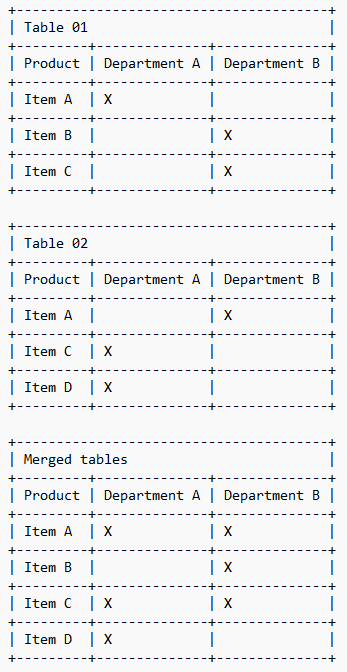
I have 2 separate tables to store products. Although it is 2 different tables, their structure is exactly the same.


In these tables, each line has an item and the indication to which departments it should be made available.


However, because there are 2 tables, the same item can appear in the tables and in each one marking different departments.


I would like to make a table unifying the 2 previous ones and making sure that the item that appears repeated in the tables does not come out in 2 lines but that its line is merged, pointing in the new table the departments of the 2 tables.


Obviously this concept of departments is not real, I just used it to try to better explain my situation.


Please can you help me to resolve this?


APAGAR.png

1 ACCEPTED SOLUTION
jennratten
Super User
Super User

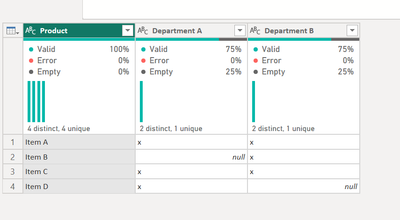
Hello - here is how you can accomplish this.

SCRIPT

let
    Source = Table.Combine({Table01, Table02}),
    #"Unpivoted Columns" = Table.UnpivotOtherColumns(Source, {"Product"}, "Attribute", "Value"),
    #"Filtered Rows" = Table.SelectRows(#"Unpivoted Columns", each ([Value] = "x")),
    #"Pivoted Column" = Table.Pivot(#"Filtered Rows", List.Distinct(#"Filtered Rows"[Attribute]), "Attribute", "Value")
in
    #"Pivoted Column"

jennratten_0-1679318928329.png


View solution in original post

2 REPLIES 2
WillianLopes
New Member

That's perfect!

jennratten
Super User
Super User

Hello - here is how you can accomplish this.

SCRIPT

let
    Source = Table.Combine({Table01, Table02}),
    #"Unpivoted Columns" = Table.UnpivotOtherColumns(Source, {"Product"}, "Attribute", "Value"),
    #"Filtered Rows" = Table.SelectRows(#"Unpivoted Columns", each ([Value] = "x")),
    #"Pivoted Column" = Table.Pivot(#"Filtered Rows", List.Distinct(#"Filtered Rows"[Attribute]), "Attribute", "Value")
in
    #"Pivoted Column"

jennratten_0-1679318928329.png


Helpful resources

Announcements
Power BI DataViz World Championships

Power BI Dataviz World Championships

The Power BI Data Visualization World Championships is back! Get ahead of the game and start preparing now!

November Power BI Update Carousel

Power BI Monthly Update - November 2025

Check out the November 2025 Power BI update to learn about new features.

FabCon Atlanta 2026 carousel

FabCon Atlanta 2026

Join us at FabCon Atlanta, March 16-20, for the ultimate Fabric, Power BI, AI and SQL community-led event. Save $200 with code FABCOMM.