Get certified for free when you join Fabric Data Days 2026 and dive into Fabric, Power BI, SQL, AI, and other essential data skills.
Join nowData Days is here! Join us now for 60+ days of learning, challenges, and connection. Learn more
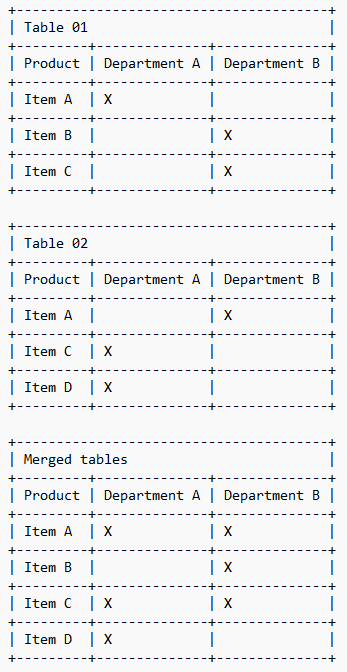
I have 2 separate tables to store products. Although it is 2 different tables, their structure is exactly the same.
In these tables, each line has an item and the indication to which departments it should be made available.
However, because there are 2 tables, the same item can appear in the tables and in each one marking different departments.
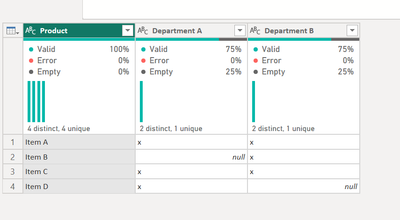
I would like to make a table unifying the 2 previous ones and making sure that the item that appears repeated in the tables does not come out in 2 lines but that its line is merged, pointing in the new table the departments of the 2 tables.
Obviously this concept of departments is not real, I just used it to try to better explain my situation.
Please can you help me to resolve this?
Solved! Go to Solution.
Hello - here is how you can accomplish this.
SCRIPT
let
Source = Table.Combine({Table01, Table02}),
#"Unpivoted Columns" = Table.UnpivotOtherColumns(Source, {"Product"}, "Attribute", "Value"),
#"Filtered Rows" = Table.SelectRows(#"Unpivoted Columns", each ([Value] = "x")),
#"Pivoted Column" = Table.Pivot(#"Filtered Rows", List.Distinct(#"Filtered Rows"[Attribute]), "Attribute", "Value")
in
#"Pivoted Column"
That's perfect!
Hello - here is how you can accomplish this.
SCRIPT
let
Source = Table.Combine({Table01, Table02}),
#"Unpivoted Columns" = Table.UnpivotOtherColumns(Source, {"Product"}, "Attribute", "Value"),
#"Filtered Rows" = Table.SelectRows(#"Unpivoted Columns", each ([Value] = "x")),
#"Pivoted Column" = Table.Pivot(#"Filtered Rows", List.Distinct(#"Filtered Rows"[Attribute]), "Attribute", "Value")
in
#"Pivoted Column"
Don't miss out on Data Days, June 15 through August 7. Learn Fabric, Power BI, SQL, AI and more.
Check out the May 2026 Power BI update to learn about new features.
| User | Count |
|---|---|
| 4 | |
| 4 | |
| 2 | |
| 2 | |
| 1 |
| User | Count |
|---|---|
| 11 | |
| 11 | |
| 5 | |
| 4 | |
| 4 |