Get certified for free when you join Fabric Data Days 2026 and dive into Fabric, Power BI, SQL, AI, and other essential data skills.
Join nowJuly 28 - August 9 | Final Round of the Power BI Dataviz World Championships. This is your chance. Learn more
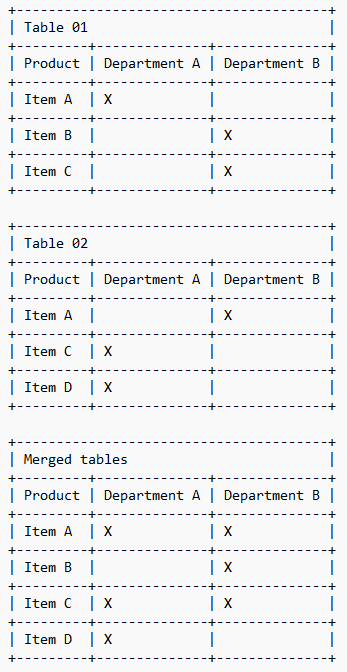
I have 2 separate tables to store products. Although it is 2 different tables, their structure is exactly the same.
In these tables, each line has an item and the indication to which departments it should be made available.
However, because there are 2 tables, the same item can appear in the tables and in each one marking different departments.
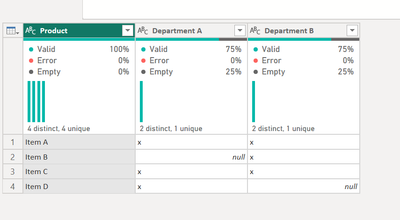
I would like to make a table unifying the 2 previous ones and making sure that the item that appears repeated in the tables does not come out in 2 lines but that its line is merged, pointing in the new table the departments of the 2 tables.
Obviously this concept of departments is not real, I just used it to try to better explain my situation.
Please can you help me to resolve this?
Solved! Go to Solution.
Hello - here is how you can accomplish this.
SCRIPT
let
Source = Table.Combine({Table01, Table02}),
#"Unpivoted Columns" = Table.UnpivotOtherColumns(Source, {"Product"}, "Attribute", "Value"),
#"Filtered Rows" = Table.SelectRows(#"Unpivoted Columns", each ([Value] = "x")),
#"Pivoted Column" = Table.Pivot(#"Filtered Rows", List.Distinct(#"Filtered Rows"[Attribute]), "Attribute", "Value")
in
#"Pivoted Column"
That's perfect!
Hello - here is how you can accomplish this.
SCRIPT
let
Source = Table.Combine({Table01, Table02}),
#"Unpivoted Columns" = Table.UnpivotOtherColumns(Source, {"Product"}, "Attribute", "Value"),
#"Filtered Rows" = Table.SelectRows(#"Unpivoted Columns", each ([Value] = "x")),
#"Pivoted Column" = Table.Pivot(#"Filtered Rows", List.Distinct(#"Filtered Rows"[Attribute]), "Attribute", "Value")
in
#"Pivoted Column"
Join us in Barcelona for FabCon and SQLCon, the Fabric, Power BI, SQL, and AI community event. Save €200 with code FABCMTY200.
If you love stickers, then you will definitely want to check out our community sticker challenge, Barcelona edition!
Check out the July 2026 Power BI update to learn about new features.