cancel
Showing results for 
Search instead for 
Did you mean: 

We've captured the moments from FabCon & SQLCon that everyone is talking about, and we are bringing them to the community, live and on-demand. Starts on April 14th. Register now

Reply
Anonymous
Not applicable

Matrix or Table Please Help

Hi guys

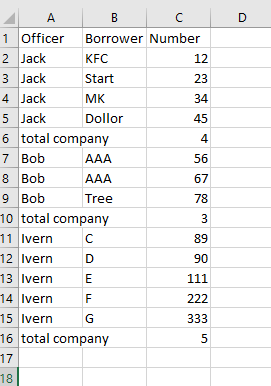
Recently, I'm trying to build a report that contain Officer, Company and Number. Like this:

awawaw_0-1652469088018.png

the problem I have is when I using matrix (I put Officer and company in rows), it will merge all the rows with same company name like row 7 & 8 will merge into one row. Btw, I put count Officer in value, so that matrix will provide me the total company count. 

Another way, I tried to use table, but it can not expand or collapse also, I don't know how to add the total company count for each officer. Please help me.

Thank you so much


1 ACCEPTED SOLUTION

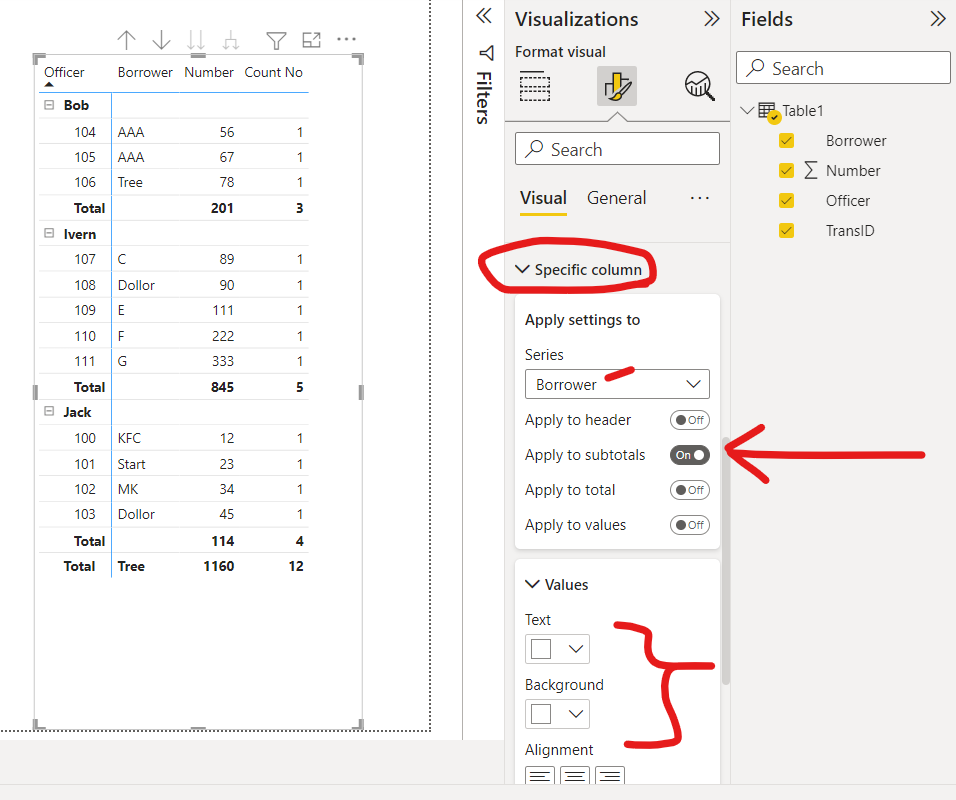
I actually like this view better.  I put the borrower in the values and then made the borrower subtotals white to "hide" this against the background.  Enjoy!  Tom


matrix2.png

View solution in original post

5 REPLIES 5
tom480
Resolver I
Resolver I

Here's the PBIX if you want to see all the visual parameters.  Tom

tom480
Resolver I
Resolver I

Hi @Anonymous ,


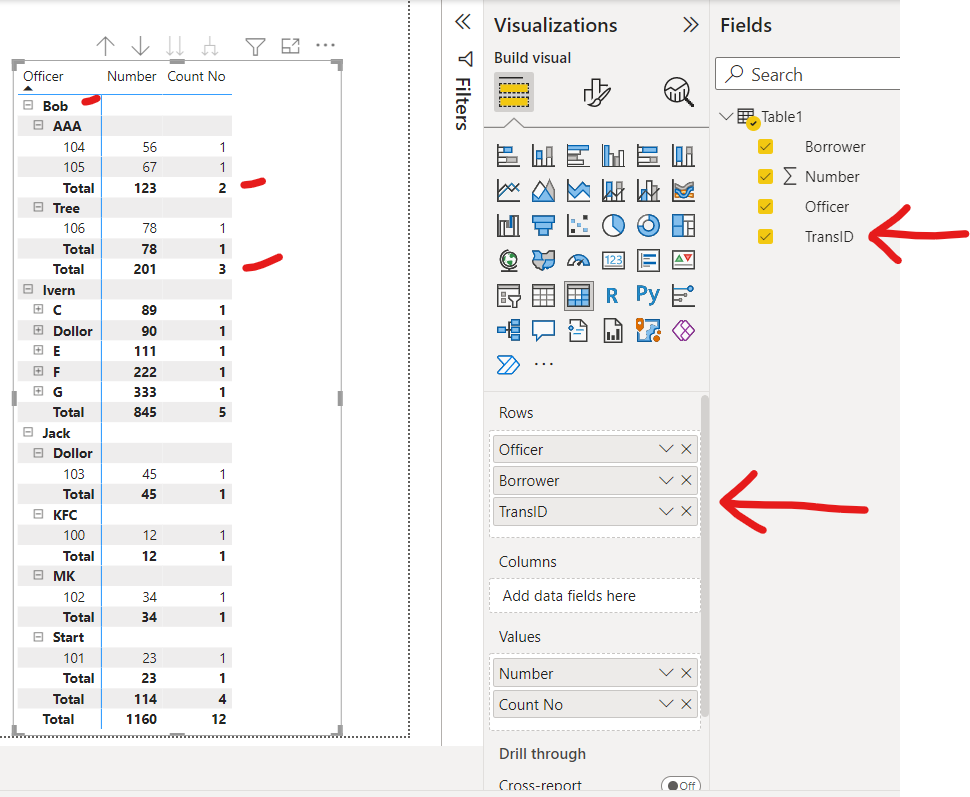
There's a lot of ways to do this, here's one idea:  In my example table, I added a transaciton ID to each row (to represent a loan transaction).  From there, it works in the matrix with subtotals displaying each transaction (aka row).


If this is helpful, please mark as a solution to help others find solutions too!  Always glad to help!  Tom 😀


I added a transaction ID to each row to make the matrix work the way you wantedI added a transaction ID to each row to make the matrix work the way you wanted

I actually like this view better.  I put the borrower in the values and then made the borrower subtotals white to "hide" this against the background.  Enjoy!  Tom


matrix2.png

Anonymous
Not applicable

Hi Tom, I still have a question. Is there any way that I can make the value align center but still make subtotal as white (invisible)?

Anonymous
Not applicable

Hi Tom

This was amazing! Thank you so much!

Helpful resources

Announcements
New to Fabric survey Carousel

New to Fabric Survey

If you have recently started exploring Fabric, we'd love to hear how it's going. Your feedback can help with product improvements.

Power BI DataViz World Championships carousel

Power BI DataViz World Championships - June 2026

A new Power BI DataViz World Championship is coming this June! Don't miss out on submitting your entry.

Join our Fabric User Panel

Join our Fabric User Panel

Share feedback directly with Fabric product managers, participate in targeted research studies and influence the Fabric roadmap.

March Power BI Update Carousel

Power BI Community Update - March 2026

Check out the March 2026 Power BI update to learn about new features.