cancel
Showing results for 
Search instead for 
Did you mean: 

The Power BI Data Visualization World Championships is back! Get ahead of the game and start preparing now! Learn more

Reply
Anonymous
Not applicable

M code in Power query Custom Column created not consistent

Hi All


This one is doing my head in. 


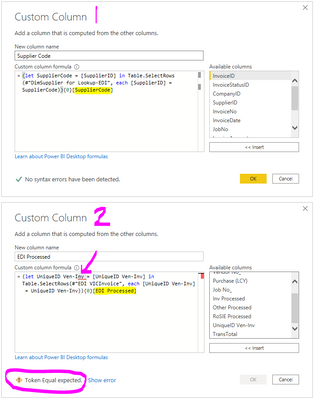
Custom Column 1 -> I created a Custom Column in Power Query Editor where the "SupplierCode" from another table (DimmSupplier for Lookup-EDI) is looked up and added into the table where the SupplierCode = SupplierID.  Works just fine


Custom Column 2 ->So now I want to do the same between two other tables and  I get the "Token Equal expected" error message.


I know it is going to be something silly, but I just cannot figure it out.


Any help or another way of doing it will be appreciated.


DeonDP_0-1603857928049.png


1 ACCEPTED SOLUTION
wdx223_Daniel
Super User
Super User

@Anonymous  variant name can not include space, if you do need a space in the name ,try to bracket it in #"", such as #"Var Name"

View solution in original post

2 REPLIES 2
wdx223_Daniel
Super User
Super User

@Anonymous  variant name can not include space, if you do need a space in the name ,try to bracket it in #"", such as #"Var Name"

Anonymous
Not applicable

Awesome!! You are DA MAN DAN!! Working just fine now.

Helpful resources

Announcements
Power BI DataViz World Championships

Power BI Dataviz World Championships

The Power BI Data Visualization World Championships is back! Get ahead of the game and start preparing now!

November Power BI Update Carousel

Power BI Monthly Update - November 2025

Check out the November 2025 Power BI update to learn about new features.

FabCon Atlanta 2026 carousel

FabCon Atlanta 2026

Join us at FabCon Atlanta, March 16-20, for the ultimate Fabric, Power BI, AI and SQL community-led event. Save $200 with code FABCOMM.