Get certified for free when you join Fabric Data Days 2026 and dive into Fabric, Power BI, SQL, AI, and other essential data skills.
Join nowJuly 7 - July 17 | Round 2 of the Power BI Dataviz World Championships. Don't miss your chance! Learn more
Hi All
This one is doing my head in.
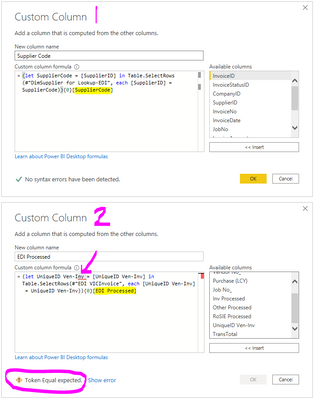
Custom Column 1 -> I created a Custom Column in Power Query Editor where the "SupplierCode" from another table (DimmSupplier for Lookup-EDI) is looked up and added into the table where the SupplierCode = SupplierID. Works just fine
Custom Column 2 ->So now I want to do the same between two other tables and I get the "Token Equal expected" error message.
I know it is going to be something silly, but I just cannot figure it out.
Any help or another way of doing it will be appreciated.
Solved! Go to Solution.
@Anonymous variant name can not include space, if you do need a space in the name ,try to bracket it in #"", such as #"Var Name"
Awesome!! You are DA MAN DAN!! Working just fine now.
Join us in Barcelona for FabCon and SQLCon, the Fabric, Power BI, SQL, and AI community event. Save €200 with code FABCMTY200.
Join Fabric Data Days 2026: 60 days of free live/on-demand sessions, challenges, study groups, and certification opportunities.
| User | Count |
|---|---|
| 8 | |
| 6 | |
| 5 | |
| 4 | |
| 4 |