cancel
Showing results for 
Search instead for 
Did you mean: 

Next up in the FabCon + SQLCon recap series: The roadmap for Microsoft SQL and Maximizing Developer experiences in Fabric. All sessions are available on-demand after the live show. Register now

Reply
agd50
Helper V
Helper V

M Language Conditional Statements - How To

I'm looking to add a prefix to an existing column but only if it doesn't already have the prefix/conditional.

Any suggestions for how to do this?

2 ACCEPTED SOLUTIONS
BA_Pete
Super User
Super User

Hi @agd50 ,


Difficult to give an exact answer without seeing an example of your data, but the basic conditional structure in Power Query M is as follows:

if <this thing is true>
then <do this thing>
else if <this other thing is true>
then <do this other thing>
else <do this escape action>


The "<do this thing>" part can be to run a function or to declare a variable etc. Therefore, a new custom QUERY STEP for your purpose might look something like this:

Table.ReplaceValue(
    PreviousStepName,
    each [ColumnToCheck],
    each if Text.StartsWith([ColumnToCheck], "Prefix")
        then [ColumnToCheck]
        else "Prefix " & [ColumnToCheck],
    Replacer.ReplaceText,
    {"ColumnToCheck"}
)


Pete


Now accepting Kudos! If my post helped you, why not give it a thumbs-up?

Proud to be a Datanaut!


View solution in original post

Anonymous
Not applicable

Hi @agd50 ,

I hope this will help you.
Suppose, I want to prefix all rows in column1 with "1. Here I chose to create a new column in order to allow for a clearer comparison.
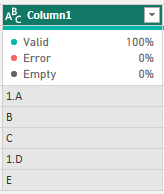
vjunyantmsft_0-1704954904751.png

Here is the content in the advanced editor:


let
    Source = Table.FromRows(Json.Document(Binary.Decompress(Binary.FromText("i45WMtRzVIrViVZyApPOYNJQzwVMuyrFxgIA", BinaryEncoding.Base64), Compression.Deflate)), let _t = ((type nullable text) meta [Serialized.Text = true]) in type table [Column1 = _t]),
    #"Changed Type" = Table.TransformColumnTypes(Source,{{"Column1", type text}}),
    #"Added Custom" = Table.AddColumn(#"Changed Type", "New", each if Text.Start([Column1], 2) = "1." then [Column1] else "1."&[Column1])
in
    #"Added Custom"


The final output is like below:
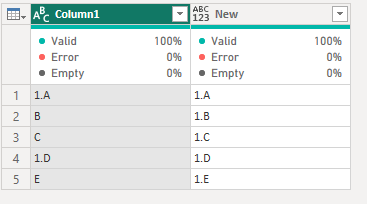
vjunyantmsft_1-1704954969479.png

Best Regards,
Dino Tao
If this post helps, then please consider Accept it as the solution to help the other members find it more quickly.

View solution in original post

2 REPLIES 2
Anonymous
Not applicable

Hi @agd50 ,

I hope this will help you.
Suppose, I want to prefix all rows in column1 with "1. Here I chose to create a new column in order to allow for a clearer comparison.

vjunyantmsft_0-1704954904751.png

Here is the content in the advanced editor:


let
    Source = Table.FromRows(Json.Document(Binary.Decompress(Binary.FromText("i45WMtRzVIrViVZyApPOYNJQzwVMuyrFxgIA", BinaryEncoding.Base64), Compression.Deflate)), let _t = ((type nullable text) meta [Serialized.Text = true]) in type table [Column1 = _t]),
    #"Changed Type" = Table.TransformColumnTypes(Source,{{"Column1", type text}}),
    #"Added Custom" = Table.AddColumn(#"Changed Type", "New", each if Text.Start([Column1], 2) = "1." then [Column1] else "1."&[Column1])
in
    #"Added Custom"


The final output is like below:

vjunyantmsft_1-1704954969479.png

Best Regards,
Dino Tao
If this post helps, then please consider Accept it as the solution to help the other members find it more quickly.

BA_Pete
Super User
Super User

Hi @agd50 ,


Difficult to give an exact answer without seeing an example of your data, but the basic conditional structure in Power Query M is as follows:

if <this thing is true>
then <do this thing>
else if <this other thing is true>
then <do this other thing>
else <do this escape action>


The "<do this thing>" part can be to run a function or to declare a variable etc. Therefore, a new custom QUERY STEP for your purpose might look something like this:

Table.ReplaceValue(
    PreviousStepName,
    each [ColumnToCheck],
    each if Text.StartsWith([ColumnToCheck], "Prefix")
        then [ColumnToCheck]
        else "Prefix " & [ColumnToCheck],
    Replacer.ReplaceText,
    {"ColumnToCheck"}
)


Pete


Now accepting Kudos! If my post helped you, why not give it a thumbs-up?

Proud to be a Datanaut!


Helpful resources

Announcements
New to Fabric survey Carousel

New to Fabric Survey

If you have recently started exploring Fabric, we'd love to hear how it's going. Your feedback can help with product improvements.

Power BI DataViz World Championships carousel

Power BI DataViz World Championships - June 2026

A new Power BI DataViz World Championship is coming this June! Don't miss out on submitting your entry.

Join our Fabric User Panel

Join our Fabric User Panel

Share feedback directly with Fabric product managers, participate in targeted research studies and influence the Fabric roadmap.

March Power BI Update Carousel

Power BI Community Update - March 2026

Check out the March 2026 Power BI update to learn about new features.