cancel
Showing results for 
Search instead for 
Did you mean: 

Data Days is here! Join us now for 60+ days of learning, challenges, and connection. Learn more

Reply
prabhuk
Helper I
Helper I

M Code query

Hi Friends,

I need to have a cod for the belwo senario


In a sheet Colomn "A" has "Grade 1" and Column "B" has "USA" and Column"C" has "Apple"  then rest of the rows where ever Column "B" has "USA" and column"C" has "Apple" colume "A" to be updated with "Grade1"


In a netshell if Column A has some string same to be repeated  in the rest of the row in Colomn A where ever column B&C data's are matching.


Can we bring this in power query "M Code" ?


Regrds,

Prabhu   


1 ACCEPTED SOLUTION
Fowmy
Super User
Super User

@prabhuk 

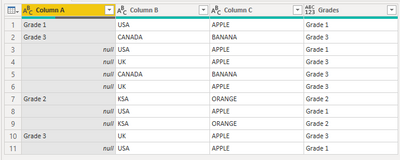
Create a blank Query, go to the Advanced Editor, clear the existing code, and paste the codes give below and check the steps. I attached the file below my signature.

let
    Source = Table.FromRows(Json.Document(Binary.Decompress(Binary.FromText("i45Wci9KTElVMFTSUQoNdgSSjgEBPq5KsTowGWOgmLOjn6MLSNIJyPBzBMti0QAS8kYXwaXXG4tdRkAxb7Ch/kGOfu6ueCzCUIZwLaYbUPTHAgA=", BinaryEncoding.Base64), Compression.Deflate)), let _t = ((type nullable text) meta [Serialized.Text = true]) in type table [#"Column A" = _t, #"Column B" = _t, #"Column C" = _t]),
    #"Changed Type" = Table.TransformColumnTypes(Source,{{"Column A", type text}, {"Column B", type text}, {"Column C", type text}}),
    #"Replaced Value" = Table.ReplaceValue(#"Changed Type","",null,Replacer.ReplaceValue,{"Column A"}),
    #"Added Custom" = Table.AddColumn(#"Replaced Value", "Grades", each Table.SelectRows(#"Replaced Value", (x)=>  x[Column A]<>null and x[Column B] = [Column B] and x[Column C] = [Column C] )[Column A]{0})
in
    #"Added Custom"


Fowmy_0-1623829866292.png


Did I answer your question? Mark my post as a solution! and hit thumbs up


Subscribe and learn Power BI from these videos

Website LinkedIn PBI User Group

View solution in original post

1 REPLY 1
Fowmy
Super User
Super User

@prabhuk 

Create a blank Query, go to the Advanced Editor, clear the existing code, and paste the codes give below and check the steps. I attached the file below my signature.

let
    Source = Table.FromRows(Json.Document(Binary.Decompress(Binary.FromText("i45Wci9KTElVMFTSUQoNdgSSjgEBPq5KsTowGWOgmLOjn6MLSNIJyPBzBMti0QAS8kYXwaXXG4tdRkAxb7Ch/kGOfu6ueCzCUIZwLaYbUPTHAgA=", BinaryEncoding.Base64), Compression.Deflate)), let _t = ((type nullable text) meta [Serialized.Text = true]) in type table [#"Column A" = _t, #"Column B" = _t, #"Column C" = _t]),
    #"Changed Type" = Table.TransformColumnTypes(Source,{{"Column A", type text}, {"Column B", type text}, {"Column C", type text}}),
    #"Replaced Value" = Table.ReplaceValue(#"Changed Type","",null,Replacer.ReplaceValue,{"Column A"}),
    #"Added Custom" = Table.AddColumn(#"Replaced Value", "Grades", each Table.SelectRows(#"Replaced Value", (x)=>  x[Column A]<>null and x[Column B] = [Column B] and x[Column C] = [Column C] )[Column A]{0})
in
    #"Added Custom"


Fowmy_0-1623829866292.png


Did I answer your question? Mark my post as a solution! and hit thumbs up


Subscribe and learn Power BI from these videos

Website LinkedIn PBI User Group

Helpful resources

Announcements
Fabric Data Days is here Carousel

Fabric Data Days 2026

Don't miss out on Data Days, June 15 through August 7. Learn Fabric, Power BI, SQL, AI and more.

May Power BI Update Carousel

Power BI Monthly Update - May 2026

Check out the May 2026 Power BI update to learn about new features.

Power BI DataViz World Championships carousel

Power BI DataViz World Championships - June 2026

A new Power BI DataViz World Championship is coming this June! Don't miss out on submitting your entry.