This is best Fabric, Power BI, SQL and AI community event. How do we know? The last event sold out! Save €200 with code FABCMTY200.
Register nowA new Data Days event is coming soon! This time we’re going bigger than ever. Fabric, Power BI, SQL, AI and more. Don't miss out.
Hi Friends,
I need to have a cod for the belwo senario
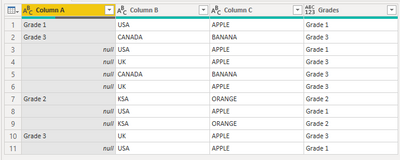
In a sheet Colomn "A" has "Grade 1" and Column "B" has "USA" and Column"C" has "Apple" then rest of the rows where ever Column "B" has "USA" and column"C" has "Apple" colume "A" to be updated with "Grade1"
In a netshell if Column A has some string same to be repeated in the rest of the row in Colomn A where ever column B&C data's are matching.
Can we bring this in power query "M Code" ?
Regrds,
Prabhu
Solved! Go to Solution.
@prabhuk
Create a blank Query, go to the Advanced Editor, clear the existing code, and paste the codes give below and check the steps. I attached the file below my signature.
let
Source = Table.FromRows(Json.Document(Binary.Decompress(Binary.FromText("i45Wci9KTElVMFTSUQoNdgSSjgEBPq5KsTowGWOgmLOjn6MLSNIJyPBzBMti0QAS8kYXwaXXG4tdRkAxb7Ch/kGOfu6ueCzCUIZwLaYbUPTHAgA=", BinaryEncoding.Base64), Compression.Deflate)), let _t = ((type nullable text) meta [Serialized.Text = true]) in type table [#"Column A" = _t, #"Column B" = _t, #"Column C" = _t]),
#"Changed Type" = Table.TransformColumnTypes(Source,{{"Column A", type text}, {"Column B", type text}, {"Column C", type text}}),
#"Replaced Value" = Table.ReplaceValue(#"Changed Type","",null,Replacer.ReplaceValue,{"Column A"}),
#"Added Custom" = Table.AddColumn(#"Replaced Value", "Grades", each Table.SelectRows(#"Replaced Value", (x)=> x[Column A]<>null and x[Column B] = [Column B] and x[Column C] = [Column C] )[Column A]{0})
in
#"Added Custom"
⭕ Subscribe and learn Power BI from these videos
⚪ Website ⚪ LinkedIn ⚪ PBI User Group
@prabhuk
Create a blank Query, go to the Advanced Editor, clear the existing code, and paste the codes give below and check the steps. I attached the file below my signature.
let
Source = Table.FromRows(Json.Document(Binary.Decompress(Binary.FromText("i45Wci9KTElVMFTSUQoNdgSSjgEBPq5KsTowGWOgmLOjn6MLSNIJyPBzBMti0QAS8kYXwaXXG4tdRkAxb7Ch/kGOfu6ueCzCUIZwLaYbUPTHAgA=", BinaryEncoding.Base64), Compression.Deflate)), let _t = ((type nullable text) meta [Serialized.Text = true]) in type table [#"Column A" = _t, #"Column B" = _t, #"Column C" = _t]),
#"Changed Type" = Table.TransformColumnTypes(Source,{{"Column A", type text}, {"Column B", type text}, {"Column C", type text}}),
#"Replaced Value" = Table.ReplaceValue(#"Changed Type","",null,Replacer.ReplaceValue,{"Column A"}),
#"Added Custom" = Table.AddColumn(#"Replaced Value", "Grades", each Table.SelectRows(#"Replaced Value", (x)=> x[Column A]<>null and x[Column B] = [Column B] and x[Column C] = [Column C] )[Column A]{0})
in
#"Added Custom"
⭕ Subscribe and learn Power BI from these videos
⚪ Website ⚪ LinkedIn ⚪ PBI User Group
Check out the May 2026 Power BI update to learn about new features.
Sign up to receive a private message when registration opens and key events begin.
If you have recently started exploring Fabric, we'd love to hear how it's going. Your feedback can help with product improvements.
| User | Count |
|---|---|
| 3 | |
| 3 | |
| 2 | |
| 2 | |
| 1 |