This is best Fabric, Power BI, SQL and AI community event. How do we know? The last event sold out! Save €200 with code FABCMTY200.
Register nowA new Data Days event is coming soon! This time we’re going bigger than ever. Fabric, Power BI, SQL, AI and more. Don't miss out.
Hello,
I have some difficulty with loops in Power Query.
I would like to create a column in PowerQuery, named « Number » with this conditions :
It would be great if you could help me with this
Here is the example file : https://drive.google.com/file/d/1E1zRuQqZIEbqix0BkDjPEiMnKQ4HGV-1/view?usp=sharing
Thanks !
Solved! Go to Solution.
Add an Index from 1 to the original table. This helps with ordering and we'll use it to merge later.
Using 'Duplicate', make 2 copies of the table.
The first copy-> rename it to 'TableX19' and filter the Headings column to "S21.G00.30.019". Add an Index column 'IndexLink' from 1.
The second copy -> rename it to 'TableX01' and filter the Headings column to "S21.G00.30.001". Add an Index column 'IndexLink' from 1.
Starting from TableX01, Merge the table with 'TableX19' on the IndexLink column using InnerJoin.
Expand the column with the table to only return the Values (which will be 2,4,6)
Select the original table. Using 'Merge as New', merge it with TableX01 on the Index column (not IndexLink) using Left Outer.
Expand the column with table to return the Values(2,4,6).
You may need to reorder the table on Index at this point (I did) because the merge switches some ordering.
You should have something like this:
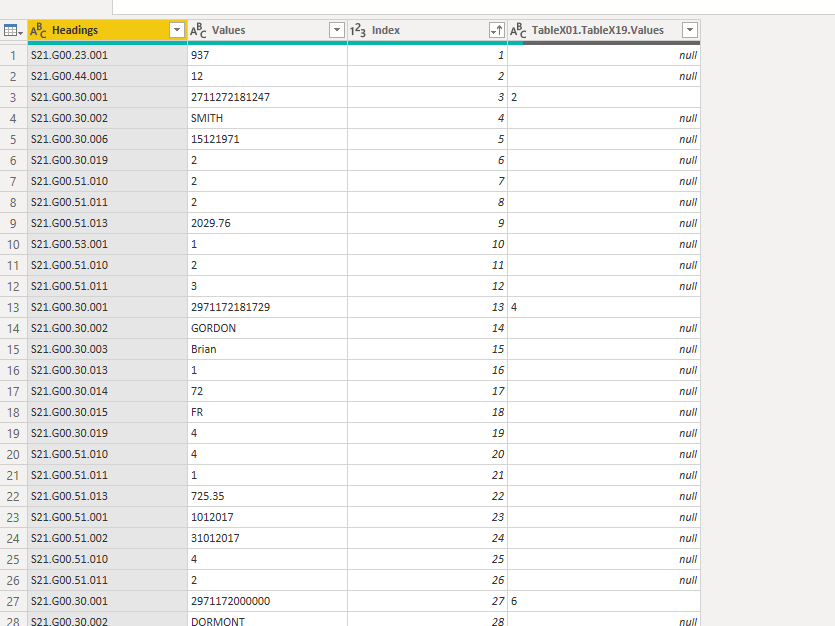
Do a 'Fill Down' on the last column. Then use 'Replace Values' to replace the null values (should just be 2 left) with 0.
Good luck
@Sky571 - Huh, I've done recursion in Power Query but not sure I've ever done loops.
https://www.excelinppc.com/creating-loops-in-power-query
Looks complicated though. @ImkeF @edhans
Add an Index from 1 to the original table. This helps with ordering and we'll use it to merge later.
Using 'Duplicate', make 2 copies of the table.
The first copy-> rename it to 'TableX19' and filter the Headings column to "S21.G00.30.019". Add an Index column 'IndexLink' from 1.
The second copy -> rename it to 'TableX01' and filter the Headings column to "S21.G00.30.001". Add an Index column 'IndexLink' from 1.
Starting from TableX01, Merge the table with 'TableX19' on the IndexLink column using InnerJoin.
Expand the column with the table to only return the Values (which will be 2,4,6)
Select the original table. Using 'Merge as New', merge it with TableX01 on the Index column (not IndexLink) using Left Outer.
Expand the column with table to return the Values(2,4,6).
You may need to reorder the table on Index at this point (I did) because the merge switches some ordering.
You should have something like this:
Do a 'Fill Down' on the last column. Then use 'Replace Values' to replace the null values (should just be 2 left) with 0.
Good luck
Hello @HotChilli,
Thank you so much for your answer, it was very detailed and clear.
I have tested and it worked. I need to test another sub-recursion after, hopes it will work the same way.
Huge thanks !!
xx
Sign up to receive a private message when registration opens and key events begin.
If you have recently started exploring Fabric, we'd love to hear how it's going. Your feedback can help with product improvements.