Don't miss your chance to take the Fabric Data Engineer (DP-600) exam for FREE! Find out how by watching the DP-600 session on-demand now through April 28th.
Learn moreJoin the FabCon + SQLCon recap series. Up next: Power BI, Real-Time Intelligence, IQ and AI, and Data Factory take center stage. All sessions are available on-demand after the live show. Register now
hi, I want to lookup the work email column values with the Source 1 and Source 2 columns and identify the the value that doesnt match and ignore the blanks. can someone pls help?
| Name | Work email | Source 1 | Source 2 |
| Dave | a@abc.com | a@abc.com | |
| Bell | b@abc.com | b@abc.com | |
| Jacob | J@abc.com | J@abc.com | |
| Marty | m@abc.com | m@abc.com | |
| Wendy | w@abc.com |
results from source 1 :
results from source 2:
Thanks
Solved! Go to Solution.
@ulyssus , pls check this Lookup Value.pbix
Used Related function on Power Query back end data. Yours desired output would look something like this.
If my post helps you to find solution would be happy if you could mark my post as a solution and give it a thumbs up
Best regards
Manoj Nair
Linkedin - https://www.linkedin.com/in/manoj-nair-%E2%98%81-344666104/
@ulyssus , pls check this Lookup Value.pbix
Used Related function on Power Query back end data. Yours desired output would look something like this.
If my post helps you to find solution would be happy if you could mark my post as a solution and give it a thumbs up
Best regards
Manoj Nair
Linkedin - https://www.linkedin.com/in/manoj-nair-%E2%98%81-344666104/
Hi,
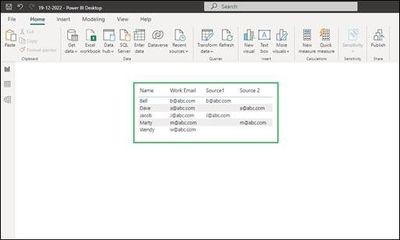
As per your requirement, there is a sample table with Work Email, Source 1, and Source 2 as shown in the below screenshot.
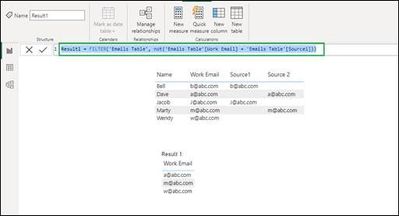
In order to get result 1 to get the work emails does not match from Source 1 we can create a new table with the below DAX expression:
Result1 = FILTER('Emails Table', not('Emails Table'[Work Email] = 'Emails Table'[Source1]))
This will create a new table with work emails that do not match with emails from Source 1 column. Please refer to the below screenshot.
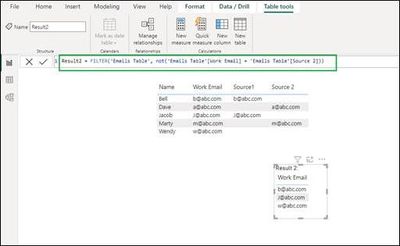
Similarly, for Result 2 we can use the DAX expression as follows which results in emails, which does not match from Source 2 column.
If this answer helps, please mark it as Accepted Solution so it would help others to find the solution.
Thanks!
Inogic Professional Services
An expert technical extension for your techno-functional business needs
Power Platform/Dynamics 365 CRM
Drop an email at crm@inogic.com
Service: http://www.inogic.com/services/
Power Platform/Dynamics 365 CRM Tips and Tricks: http://www.inogic.com/blog/
Check out the April 2026 Power BI update to learn about new features.
If you have recently started exploring Fabric, we'd love to hear how it's going. Your feedback can help with product improvements.
A new Power BI DataViz World Championship is coming this June! Don't miss out on submitting your entry.
| User | Count |
|---|---|
| 8 | |
| 6 | |
| 5 | |
| 5 | |
| 4 |