Get certified for free when you join Fabric Data Days 2026 and dive into Fabric, Power BI, SQL, AI, and other essential data skills.
Join nowJuly 28 - August 9 | Final Round of the Power BI Dataviz World Championships. This is your chance. Learn more
hi, I want to lookup the work email column values with the Source 1 and Source 2 columns and identify the the value that doesnt match and ignore the blanks. can someone pls help?
| Name | Work email | Source 1 | Source 2 |
| Dave | [email protected] | [email protected] | |
| Bell | [email protected] | [email protected] | |
| Jacob | [email protected] | [email protected] | |
| Marty | [email protected] | [email protected] | |
| Wendy | [email protected] |
results from source 1 :
results from source 2:
Thanks
Solved! Go to Solution.
@ulyssus , pls check this Lookup Value.pbix
Used Related function on Power Query back end data. Yours desired output would look something like this.
If my post helps you to find solution would be happy if you could mark my post as a solution and give it a thumbs up
Best regards
Manoj Nair
Linkedin - https://www.linkedin.com/in/manoj-nair-%E2%98%81-344666104/
@ulyssus , pls check this Lookup Value.pbix
Used Related function on Power Query back end data. Yours desired output would look something like this.
If my post helps you to find solution would be happy if you could mark my post as a solution and give it a thumbs up
Best regards
Manoj Nair
Linkedin - https://www.linkedin.com/in/manoj-nair-%E2%98%81-344666104/
Hi,
As per your requirement, there is a sample table with Work Email, Source 1, and Source 2 as shown in the below screenshot.
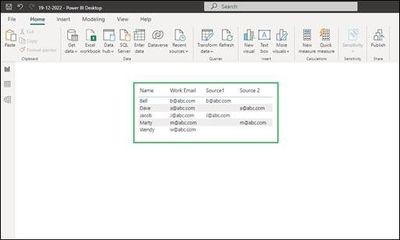
In order to get result 1 to get the work emails does not match from Source 1 we can create a new table with the below DAX expression:
Result1 = FILTER('Emails Table', not('Emails Table'[Work Email] = 'Emails Table'[Source1]))
This will create a new table with work emails that do not match with emails from Source 1 column. Please refer to the below screenshot.
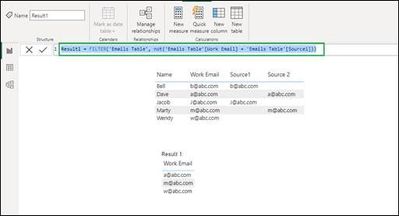
Similarly, for Result 2 we can use the DAX expression as follows which results in emails, which does not match from Source 2 column.
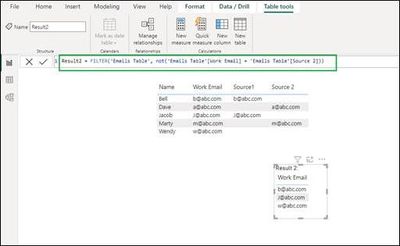
If this answer helps, please mark it as Accepted Solution so it would help others to find the solution.
Thanks!
Inogic Professional Services
An expert technical extension for your techno-functional business needs
Power Platform/Dynamics 365 CRM
Drop an email at [email protected]
Service: http://www.inogic.com/services/
Power Platform/Dynamics 365 CRM Tips and Tricks: http://www.inogic.com/blog/
If you love stickers, then you will definitely want to check out our community sticker challenge, Barcelona edition!
Check out the July 2026 Power BI update to learn about new features.
| User | Count |
|---|---|
| 4 | |
| 2 | |
| 2 | |
| 2 | |
| 1 |