Join us at FabCon Atlanta from March 16 - 20, 2026, for the ultimate Fabric, Power BI, AI and SQL community-led event. Save $200 with code FABCOMM.
Register now!Vote for your favorite vizzies from the Power BI Dataviz World Championship submissions. Vote now!
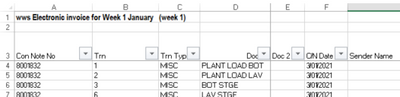
The excel files in a folder start like the SS. i.e., First two rows are some information and header starts on 3rd row.
When loading the folder into power BI, I want to know how I to remove first two rows from all excel files in the folder.
Solved! Go to Solution.
let
source=Folder.Files("your folder full path"),
custom1=Table.Combine(List.Transform(source[Content],each Table.PromoteHeaders(Table.Skip(Excel.Workbook(_)[Data]{0},2))))
in custom1
let
source=Folder.Files("your folder full path"),
custom1=Table.Combine(List.Transform(source[Content],each Table.PromoteHeaders(Table.Skip(Excel.Workbook(_)[Data]{0},2))))
in custom1
Vote for your favorite vizzies from the Power BI World Championship submissions!
If you love stickers, then you will definitely want to check out our Community Sticker Challenge!
Check out the January 2026 Power BI update to learn about new features.
| User | Count |
|---|---|
| 14 | |
| 11 | |
| 8 | |
| 7 | |
| 6 |