Get certified for free when you join Fabric Data Days 2026 and dive into Fabric, Power BI, SQL, AI, and other essential data skills.
Join nowJuly 7 - July 17 | Round 2 of the Power BI Dataviz World Championships. Don't miss your chance! Learn more
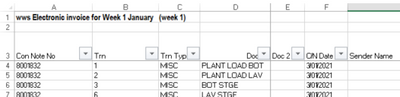
The excel files in a folder start like the SS. i.e., First two rows are some information and header starts on 3rd row.
When loading the folder into power BI, I want to know how I to remove first two rows from all excel files in the folder.
Solved! Go to Solution.
let
source=Folder.Files("your folder full path"),
custom1=Table.Combine(List.Transform(source[Content],each Table.PromoteHeaders(Table.Skip(Excel.Workbook(_)[Data]{0},2))))
in custom1
let
source=Folder.Files("your folder full path"),
custom1=Table.Combine(List.Transform(source[Content],each Table.PromoteHeaders(Table.Skip(Excel.Workbook(_)[Data]{0},2))))
in custom1
| User | Count |
|---|---|
| 12 | |
| 8 | |
| 5 | |
| 5 | |
| 5 |