cancel
Showing results for 
Search instead for 
Did you mean: 

Did you hear? There's a new SQL AI Developer certification (DP-800). Start preparing now and be one of the first to get certified. Register now

Reply
Kds1113
Helper I
Helper I

List Sum except specific value

I have a table that looks something like this: 


CategoryLocation 1Location 2 
Cat 15175.61725.2
Cat 29004.63001.533
Cat 33178.61059.533
Cat 456851895
Cat 57400.82466.933
Cat 61008.8336.2667
Cat 7708.8236.2667
Cat 816868.25622.733
Cat 984422814
Cat 1084022800.667

I want to create a column that sums Location 1 by all values except Category 8.  I don't want to filter out Category 8 as I'll need those values for the calculations of another column.


I tried nesting a table.selectrows within a List.Sum, but that didn't give me what I need. 


List.Sum(Table.SelectRows(#"Added Custom", each not ([Category] = "Cat8")))

1 ACCEPTED SOLUTION
edhans
Community Champion
Community Champion

Your basic idea is correct. The below works:


List.Sum(Table.SelectRows(#"Changed Type", each [Category] <> "Cat 8")[Location 1])


You need to include the field you want to sum at the end. Appending [Location 1] tells it what column of the filtered table to sum.
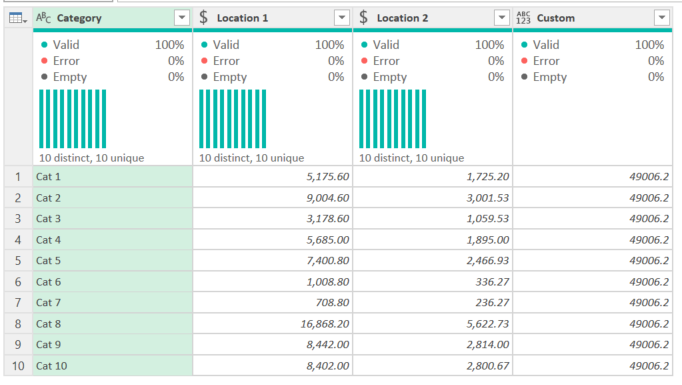
edhans_0-1670966926490.png


Full code:


let
    Source = Table.FromRows(Json.Document(Binary.Decompress(Binary.FromText("XY8xDsIwDEWvUmWuLNtJbGdm5QZVhwohxEIl1IXbE6coFDbnvfzvZJrCadmut/X5CmM4r5dlu6+PgY4HHsI8tnuNZ9IMUgdSzsDdcUUFMTUXEQlyjN1Gh6S2JzGXH5u8Vyy7s5I7d6AJEawOnESgHFJ7FVqzMQqwiHarnv1I/pcOSUwMuK1mBj00lwotJXdslL7/xyZwF/VdrXN+Aw==", BinaryEncoding.Base64), Compression.Deflate)), let _t = ((type nullable text) meta [Serialized.Text = true]) in type table [#"(blank)" = _t, #"(blank).1" = _t, #"(blank).2" = _t]),
    #"Promoted Headers" = Table.PromoteHeaders(Source, [PromoteAllScalars=true]),
    #"Changed Type" = Table.TransformColumnTypes(#"Promoted Headers",{{"Location 1", Currency.Type}, {"Location 2 ", Currency.Type}}),
    #"Added Custom" = Table.AddColumn(#"Changed Type", "Custom", each List.Sum(Table.SelectRows(#"Changed Type", each [Category] <> "Cat 8")[Location 1]))
in
    #"Added Custom"


 How to use M code provided in a blank query:
1) In Power Query, select New Source, then Blank Query
2) On the Home ribbon, select "Advanced Editor" button
3) Remove everything you see, then paste the M code I've given you in that box.
4) Press Done
5) See this article if you need help using this M code in your model.


Did I answer your question? Mark my post as a solution!
Did my answers help arrive at a solution? Give it a kudos by clicking the Thumbs Up!

DAX is for Analysis. Power Query is for Data Modeling


Proud to be a Super User!

MCSA: BI Reporting

View solution in original post

2 REPLIES 2
edhans
Community Champion
Community Champion

Your basic idea is correct. The below works:


List.Sum(Table.SelectRows(#"Changed Type", each [Category] <> "Cat 8")[Location 1])


You need to include the field you want to sum at the end. Appending [Location 1] tells it what column of the filtered table to sum.

edhans_0-1670966926490.png


Full code:


let
    Source = Table.FromRows(Json.Document(Binary.Decompress(Binary.FromText("XY8xDsIwDEWvUmWuLNtJbGdm5QZVhwohxEIl1IXbE6coFDbnvfzvZJrCadmut/X5CmM4r5dlu6+PgY4HHsI8tnuNZ9IMUgdSzsDdcUUFMTUXEQlyjN1Gh6S2JzGXH5u8Vyy7s5I7d6AJEawOnESgHFJ7FVqzMQqwiHarnv1I/pcOSUwMuK1mBj00lwotJXdslL7/xyZwF/VdrXN+Aw==", BinaryEncoding.Base64), Compression.Deflate)), let _t = ((type nullable text) meta [Serialized.Text = true]) in type table [#"(blank)" = _t, #"(blank).1" = _t, #"(blank).2" = _t]),
    #"Promoted Headers" = Table.PromoteHeaders(Source, [PromoteAllScalars=true]),
    #"Changed Type" = Table.TransformColumnTypes(#"Promoted Headers",{{"Location 1", Currency.Type}, {"Location 2 ", Currency.Type}}),
    #"Added Custom" = Table.AddColumn(#"Changed Type", "Custom", each List.Sum(Table.SelectRows(#"Changed Type", each [Category] <> "Cat 8")[Location 1]))
in
    #"Added Custom"


 How to use M code provided in a blank query:
1) In Power Query, select New Source, then Blank Query
2) On the Home ribbon, select "Advanced Editor" button
3) Remove everything you see, then paste the M code I've given you in that box.
4) Press Done
5) See this article if you need help using this M code in your model.


Did I answer your question? Mark my post as a solution!
Did my answers help arrive at a solution? Give it a kudos by clicking the Thumbs Up!

DAX is for Analysis. Power Query is for Data Modeling


Proud to be a Super User!

MCSA: BI Reporting

Perfect!  thanks for the quick reply!

Helpful resources

Announcements
April Power BI Update Carousel

Power BI Monthly Update - April 2026

Check out the April 2026 Power BI update to learn about new features.

Fabric SQL PBI Data Days

Data Days 2026 coming soon!

Sign up to receive a private message when registration opens and key events begin.

New to Fabric survey Carousel

New to Fabric Survey

If you have recently started exploring Fabric, we'd love to hear how it's going. Your feedback can help with product improvements.

Power BI DataViz World Championships carousel

Power BI DataViz World Championships - June 2026

A new Power BI DataViz World Championship is coming this June! Don't miss out on submitting your entry.