cancel
Showing results for 
Search instead for 
Did you mean: 

July 7 - July 17 | Round 2 of the Power BI Dataviz World Championships. Don't miss your chance! Learn more

Reply
Anonymous
Not applicable

List.Generate - Connect to REST API without Total Number of Pages and Total Number of Entries

Hello Guys,


I'm trying to get data from a REST API that doesn't have total number of pages or total number of entries.

I have search on internet for answer but none fit for my challenge, so I came here to get sugestions.

So, the first part I got it. I made a funciont name "GetPageClientes",


= (page as text) =>
let
Source = try Json.Document(Web.Contents("https://api.mysite.io/v2/customers?page=" & page & "&limit=1000", [Headers=[Authorization="Bearer NTg***********"]])) otherwise [customers=null],
#"Converted to Table" = Table.FromRecords({Source})
in
#"Converted to Table"


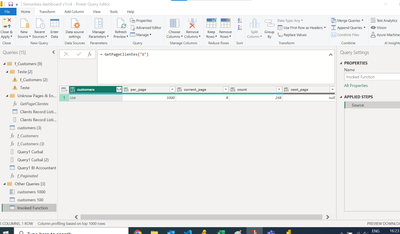
and after some tentatives I got the total number of pages, in the case, 8 pages.
teste11234_0-1672255441031.png


In the sequence, I looked for List.Generate


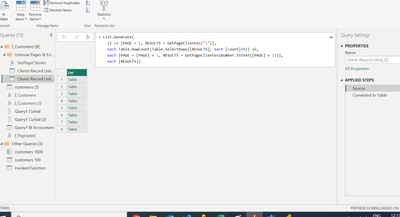
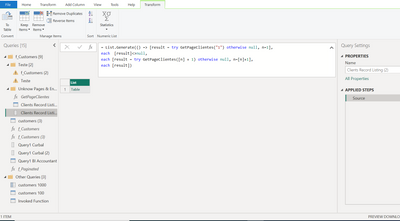
= List.Generate(() => [result = try GetPageClientes("1") otherwise null, n=1],
each [result]<>null,
each [result = try GetPageClientes([n] + 1) otherwise null, n=[n]+1],
each [result])


to list everypage together, but It's not easy for me and not work as intended as well.
 

teste11234_1-1672255618518.png

So, if anyone could help, I will appreciate.

--

Thank all.

Alexandre.

1 ACCEPTED SOLUTION
Anonymous
Not applicable

I got it... i got it... i'm sooooooo happy.


= List.Generate(
() => [PAGE = 1, RESULTS = GetPageClientes("1")],
each Table.RowCount(Table.SelectRows([RESULTS], each [count]>0)) >0,
each [PAGE = [PAGE] + 1, RESULTS = GetPageClientes(Number.ToText([PAGE] + 1))],
each [RESULTS])


teste11234_0-1672327066049.png

My research was that:

https://www.dalesandro.net/handling-paginated-rest-api-results-with-power-query/

https://community.powerbi.com/t5/Power-Query/List-generation-not-stopping-pagination-without-knowing...

https://www.thebiccountant.com/2020/05/15/miss-last-page-paging-power-bi-power-query/

https://www.youtube.com/watch?v=05yhwnuCjRw

https://www.youtube.com/watch?v=IASH1Fr16HY


View solution in original post

4 REPLIES 4
Anonymous
Not applicable

I got it... i got it... i'm sooooooo happy.


= List.Generate(
() => [PAGE = 1, RESULTS = GetPageClientes("1")],
each Table.RowCount(Table.SelectRows([RESULTS], each [count]>0)) >0,
each [PAGE = [PAGE] + 1, RESULTS = GetPageClientes(Number.ToText([PAGE] + 1))],
each [RESULTS])


teste11234_0-1672327066049.png

My research was that:

https://www.dalesandro.net/handling-paginated-rest-api-results-with-power-query/

https://community.powerbi.com/t5/Power-Query/List-generation-not-stopping-pagination-without-knowing...

https://www.thebiccountant.com/2020/05/15/miss-last-page-paging-power-bi-power-query/

https://www.youtube.com/watch?v=05yhwnuCjRw

https://www.youtube.com/watch?v=IASH1Fr16HY


ImkeF
Community Champion
Community Champion

Hi @Anonymous ,
that really is an annoying behaviour. Please check out this blogpost where I've described a workaraound: How not to miss the last page when paging with Power BI and Power Query (thebiccountant.com)

Imke Feldmann (The BIccountant)

If you liked my solution, please give it a thumbs up. And if I did answer your question, please mark this post as a solution. Thanks!

How to integrate M-code into your solution -- How to get your questions answered quickly -- How to provide sample data -- Check out more PBI- learning resources here -- Performance Tipps for M-queries

Anonymous
Not applicable

I love you @ImkeF . I'm going to check.

Many tks,

--

Alexandre.

Anonymous
Not applicable

hello everyone,


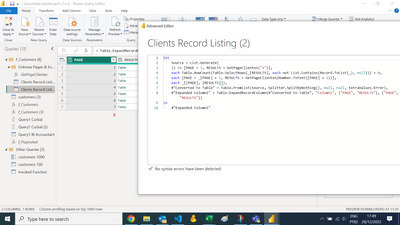
I get partial success now. I can list 7 pages, but I know that there is a 8 one.

Probably, the solution is on the line 4... if someone could suggest anything, I will appreciate.


teste11234_0-1672260694400.png


Tks in advance,

--

Alexandre.

Helpful resources

Announcements
FabCon and SQLCon Barcelona 2026

FabCon & SQLCon – Barcelona 2026

Join us in Barcelona for FabCon and SQLCon, the Fabric, Power BI, SQL, and AI community event. Save €200 with code FABCMTY200.

60 days of Data Days Carousel

Data Days 2026

Join Data Days 2026: 60 days of free live/on-demand sessions, challenges, study groups, and certification opportunities.

Power BI DataViz World Championships carousel

Power BI DataViz World Championships - June 2026

A new Power BI DataViz World Championship is coming this June! Don't miss out on submitting your entry.