Get certified for free when you join Fabric Data Days 2026 and dive into Fabric, Power BI, SQL, AI, and other essential data skills.
Join nowJuly 7 - July 17 | Round 2 of the Power BI Dataviz World Championships. Don't miss your chance! Learn more
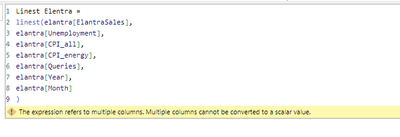
Hola, estoy intentando replicar este caso del articulo https://datakuity.com/2023/03/12/multiple-linear-regression-in-power-bi/ para una regresion multiple, pero me da el siguiente error:
¿Como utilizar linest para regresion multiple?
Solved! Go to Solution.
Hi @J3
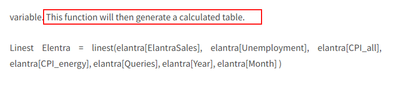
Did you create it as a calculated column or a measure, after testing , the function will return a table,it returns a table describing the line. you need to create it as a calculated table instead of a column or measure, the link you have offered, it create it as a table, you can refer to the following picture.
And you can refer to the following link.
LINEST function (DAX) - DAX | Microsoft Learn
Best Regards!
Yolo Zhu
If this post helps, then please consider Accept it as the solution to help the other members find it more quickly.
Hi @J3
Did you create it as a calculated column or a measure, after testing , the function will return a table,it returns a table describing the line. you need to create it as a calculated table instead of a column or measure, the link you have offered, it create it as a table, you can refer to the following picture.
And you can refer to the following link.
LINEST function (DAX) - DAX | Microsoft Learn
Best Regards!
Yolo Zhu
If this post helps, then please consider Accept it as the solution to help the other members find it more quickly.
Join us in Barcelona for FabCon and SQLCon, the Fabric, Power BI, SQL, and AI community event. Save €200 with code FABCMTY200.
Join Fabric Data Days 2026: 60 days of free live/on-demand sessions, challenges, study groups, and certification opportunities.
| User | Count |
|---|---|
| 8 | |
| 5 | |
| 5 | |
| 4 | |
| 4 |