Get certified for free when you join Fabric Data Days 2026 and dive into Fabric, Power BI, SQL, AI, and other essential data skills.
Join nowTry your skills in the Power BI Dataviz World Championship! Round one ends June 26. Join now
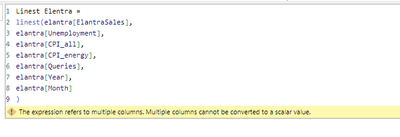
Hola, estoy intentando replicar este caso del articulo https://datakuity.com/2023/03/12/multiple-linear-regression-in-power-bi/ para una regresion multiple, pero me da el siguiente error:
¿Como utilizar linest para regresion multiple?
Solved! Go to Solution.
Hi @J3
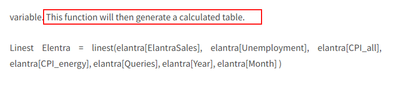
Did you create it as a calculated column or a measure, after testing , the function will return a table,it returns a table describing the line. you need to create it as a calculated table instead of a column or measure, the link you have offered, it create it as a table, you can refer to the following picture.
And you can refer to the following link.
LINEST function (DAX) - DAX | Microsoft Learn
Best Regards!
Yolo Zhu
If this post helps, then please consider Accept it as the solution to help the other members find it more quickly.
Hi @J3
Did you create it as a calculated column or a measure, after testing , the function will return a table,it returns a table describing the line. you need to create it as a calculated table instead of a column or measure, the link you have offered, it create it as a table, you can refer to the following picture.
And you can refer to the following link.
LINEST function (DAX) - DAX | Microsoft Learn
Best Regards!
Yolo Zhu
If this post helps, then please consider Accept it as the solution to help the other members find it more quickly.
Don't miss out on Data Days, June 15 through August 7. Learn Fabric, Power BI, SQL, AI and more.
Check out the May 2026 Power BI update to learn about new features.
| User | Count |
|---|---|
| 4 | |
| 3 | |
| 3 | |
| 2 | |
| 2 |
| User | Count |
|---|---|
| 11 | |
| 9 | |
| 5 | |
| 5 | |
| 4 |