Don't miss your chance to take the Fabric Data Engineer (DP-600) exam for FREE! Find out how by watching the DP-600 session on-demand now through April 28th.
Learn moreJoin the FabCon + SQLCon recap series. Up next: Power BI, Real-Time Intelligence, IQ and AI, and Data Factory take center stage. All sessions are available on-demand after the live show. Register now
Hi,
I am looking for 2 clear solutions.
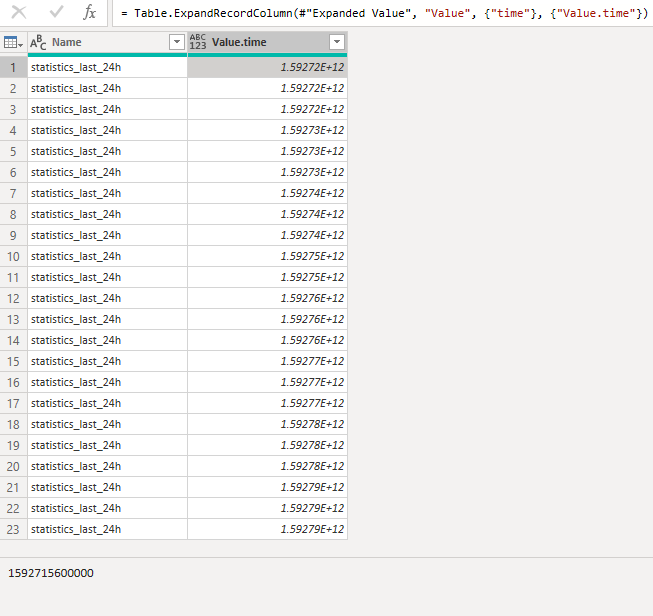
1. Query for JSON string datetime conversion to datetime in PBI.
2. Can a ONE query be executed to convert multiple columns that are currently in JSON string datetime format ?
Thanks in advance for any solutions around this.
Solved! Go to Solution.
Those are millisecond epochs.
You can use them as described here:
Hi @Anonymous ,
If possible, could you please inform me more detailed information (such as your json sample and your expected output)? Then I will try to test this in my enviornment.
Please do mask sensitive data before uploading.
Thanks for your understanding and support.
Best Regards,
Zoe Zhi
If this post helps, then please consider Accept it as the solution to help the other members find it more quickly.
JSON doesn't have a standardized datetime string format. Are you talking about ISO-8601 ? Maybe show an example of your strings?
And yes, transforms can be applied to multiple columns at the same time.
Hi @Anonymous ,
You could try @lbendlin 's suggestions and change it like below
let
Source = Table.FromRows(Json.Document(Binary.Decompress(Binary.FromText("i45WMjS1NDI3NDUzAAGl2FgA", BinaryEncoding.Base64), Compression.Deflate)), let _t = ((type text) meta [Serialized.Text = true]) in type table [name = _t]),
#"Changed Type" = Table.TransformColumnTypes(Source,{{"name", type number}}),
#"Added Custom" = Table.AddColumn(#"Changed Type", "Custom", each #datetime(1970, 1, 1, 0, 0, 0) + #duration(0, 10, 0, [name]/1000)),
#"Changed Type1" = Table.TransformColumnTypes(#"Added Custom",{{"Custom", type datetime}})
in
#"Changed Type1"
Best Regards,
Zoe Zhi
If this post helps, then please consider Accept it as the solution to help the other members find it more quickly.
Those are millisecond epochs.
You can use them as described here:
Check out the April 2026 Power BI update to learn about new features.
If you have recently started exploring Fabric, we'd love to hear how it's going. Your feedback can help with product improvements.
A new Power BI DataViz World Championship is coming this June! Don't miss out on submitting your entry.
| User | Count |
|---|---|
| 5 | |
| 4 | |
| 4 | |
| 4 | |
| 4 |