cancel
Showing results for 
Search instead for 
Did you mean: 

Data Days is here! Join us now for 60+ days of learning, challenges, and connection. Learn more

Reply
Anonymous
Not applicable

JSON datetime conversion in power query

Hi,


I am looking for 2 clear solutions.


1. Query for JSON string datetime conversion to datetime in PBI.


2. Can a ONE query be executed to convert multiple columns that are currently in JSON string datetime format ?


Thanks in advance for any solutions around this.

1 ACCEPTED SOLUTION

5 REPLIES 5
dax
Community Support
Community Support

Hi @Anonymous , 

If possible, could you please inform me more detailed information (such as your json sample and your expected output)? Then I will try to test this in my enviornment.

Please do mask sensitive data before uploading.

Thanks for your understanding and support.
Best Regards,
Zoe Zhi

If this post helps, then please consider Accept it as the solution to help the other members find it more quickly.

lbendlin
Super User
Super User

JSON doesn't have a standardized datetime string format. Are you talking about ISO-8601 ? Maybe show an example of your strings?


And yes, transforms can be applied to multiple columns at the same time.

Anonymous
Not applicable

Hi @lbendlin @dax 


Correct its ISO-8601


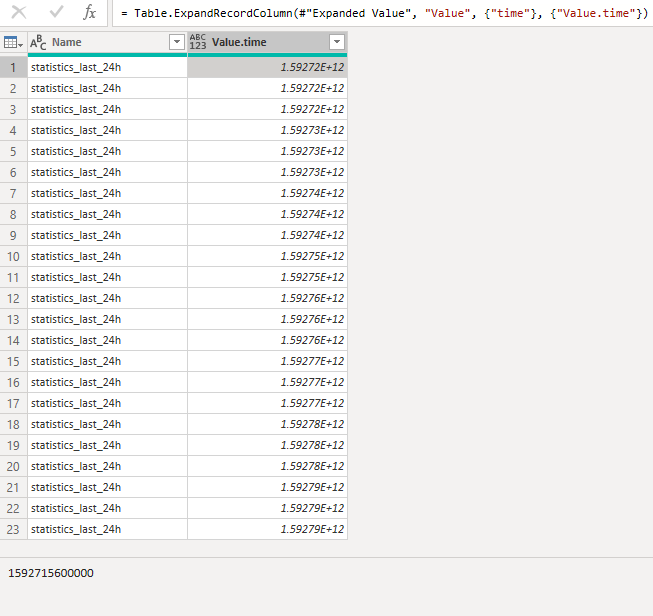
attached Screen shot of the data presented in Power BI


1592715600000

Equates to

06/21/2020 15:000:00

MM/DD/YYYY HRS:MIN:SEC


iv applied a few different queries but no luck as yet.Screen Shot 2020-06-23 at 21.56.59.png

dax
Community Support
Community Support

Hi @Anonymous , 

You could try @lbendlin 's suggestions and change it like below

let
    Source = Table.FromRows(Json.Document(Binary.Decompress(Binary.FromText("i45WMjS1NDI3NDUzAAGl2FgA", BinaryEncoding.Base64), Compression.Deflate)), let _t = ((type text) meta [Serialized.Text = true]) in type table [name = _t]),
    #"Changed Type" = Table.TransformColumnTypes(Source,{{"name", type number}}),
    #"Added Custom" = Table.AddColumn(#"Changed Type", "Custom", each #datetime(1970, 1, 1, 0, 0, 0) + #duration(0, 10, 0, [name]/1000)),
    #"Changed Type1" = Table.TransformColumnTypes(#"Added Custom",{{"Custom", type datetime}})
in
    #"Changed Type1"

Best Regards,
Zoe Zhi

If this post helps, then please consider Accept it as the solution to help the other members find it more quickly.

Those are millisecond epochs.


You can use them as described here:


https://community.powerbi.com/t5/Desktop/Converting-UNIX-time-to-Date-in-PowerBI-for-Desktop/td-p/13...

Helpful resources

Announcements
Fabric Data Days is here Carousel

Fabric Data Days 2026

Don't miss out on Data Days, June 15 through August 7. Learn Fabric, Power BI, SQL, AI and more.

May Power BI Update Carousel

Power BI Monthly Update - May 2026

Check out the May 2026 Power BI update to learn about new features.

Power BI DataViz World Championships carousel

Power BI DataViz World Championships - June 2026

A new Power BI DataViz World Championship is coming this June! Don't miss out on submitting your entry.