This time we’re going bigger than ever. Fabric, Power BI, SQL, AI and more. We're covering it all. You won't want to miss it.
Learn moreLevel up your Power BI skills this month - build one visual each week and tell better stories with data! Get started
Hello,
I have a JSON file that I am pulling via API; I am running into an issue when trying to expand the record into individual columns to access the values. Below is a snip of the JSON object. I am trying to access the start and stop within the time_bucket, but the next JSON key changes each time that value gets updated. Any insight on how to dynamically access the data would be greatly appreciated.
Solved! Go to Solution.
Hi @bboysen,
the code which I posted works with a record and I think that you are trying to apply it to a table (according to what I see).
try using AddColumn [from the point on your screenshot, i.e. the time_stamp column does exist, but not yet expanded] to add this code:
Record.Field([time_bucket], Record.FieldNames([time_bucket]){0})This will/should estract the record with start/stop regardless of the actual "tag" of the record.
Cheers,
John
I think
Hi @bboysen,
This is a generalised approach, let me know if you'll have difficulties adopting it for your scenario:
let
Source = "{""-NNNhF0luJcfv-QqKwux"": {#(cr)#(lf) ""sections"": {#(cr)#(lf) ""midpoint_section"": {#(cr)#(lf) ""time_bucket"": {#(cr)#(lf) ""-NNgtF6n9q3qeaE_ArL6"": {#(cr)#(lf) ""start"": 1675790384409,#(cr)#(lf) ""stop"": 1675790451218,#(cr)#(lf) ""uid"": ""CcjuXG7To7XXP0C0R696v7n1zHk2""#(cr)#(lf) }#(cr)#(lf) }#(cr)#(lf) }#(cr)#(lf) }#(cr)#(lf)}#(cr)#(lf)}",
json = Json.Document(Source),
record = List.Last(List.Generate(()=>json, each not List.Contains(Record.FieldNames(_), "start"), each Record.Field(_, Record.FieldNames(_){0}))),
Custom1 = Record.Field(record, Record.FieldNames(record){0})
in
Custom1
Kind regards,
John
John, thank you for the information this works great with the one recorded. When I apply this solution to my main data file it gets the following error message.
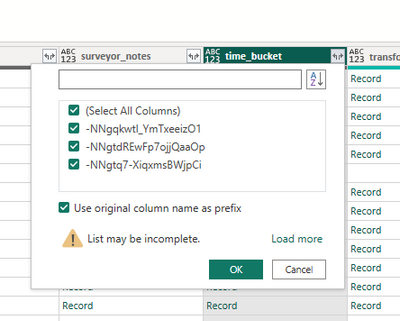
Little more detail and I should have included some of this before. When I click to expand time_bucket I get the following
When I click to load more, I get about 200 more records within the list.
Each one creates a new column within the table.
I am trying to figure out how to get down to the next record without creating new columns for each of the parent records.
Hi @bboysen,
the code which I posted works with a record and I think that you are trying to apply it to a table (according to what I see).
try using AddColumn [from the point on your screenshot, i.e. the time_stamp column does exist, but not yet expanded] to add this code:
Record.Field([time_bucket], Record.FieldNames([time_bucket]){0})This will/should estract the record with start/stop regardless of the actual "tag" of the record.
Cheers,
John
I think
John, this is money. Thank you, sir; the sad part is that I was missing one little item.
Check out the April 2026 Power BI update to learn about new features.
Sign up to receive a private message when registration opens and key events begin.
If you have recently started exploring Fabric, we'd love to hear how it's going. Your feedback can help with product improvements.