Learn from the best! Meet the four finalists headed to the FINALS of the Power BI Dataviz World Championships! Register now
Hi there,
I am trying to connect to Postgreys Database, I have provided Server & database details but I am keep getting timeout issues.
Upon detail analysis I found that there are 2 ports one (123) is restricted & another one (456) is open so I think its hitting restricted one; so how can hit to open port (456).
Regards,
Abd
Hi, @Anonymous
You could reference the ways to change timeout parameters to check if you could connect the data source without an error.
1. Add timeout parameter to connection string:
2. Otherwise, you could add timeout parameter to Query argument within M Code / Advanced Editor:
ConnectionTimeout : A duration that controls how long to wait before abandoning an attempt to make a connection to the server. The default value is 15 seconds.
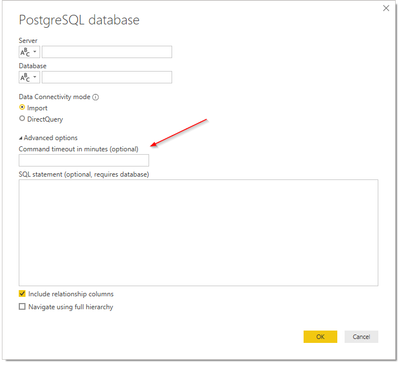
Reference:
https://docs.microsoft.com/en-us/powerquery-m/odbc-datasource
Best Regards,
Community Support Team _ Zeon Zheng
If this post helps, then please consider Accept it as the solution to help the other members find it more quickly.
Thanks for the reply @v-angzheng-msft ,
Forgot to mentioned that I already tried timeout but here the issue is the port where Power BI trying to query; its trying on restricted port so is there any way I can mention port no while trying to get data?
Also FYI I cant use ODBC due to compliance issues.
Regards,
Abd
A new Power BI DataViz World Championship is coming this June! Don't miss out on submitting your entry.
Share feedback directly with Fabric product managers, participate in targeted research studies and influence the Fabric roadmap.
| User | Count |
|---|---|
| 5 | |
| 4 | |
| 4 | |
| 3 | |
| 2 |
| User | Count |
|---|---|
| 11 | |
| 10 | |
| 8 | |
| 7 | |
| 6 |