cancel
Showing results for 
Search instead for 
Did you mean: 

Learn from the best! Meet the four finalists headed to the FINALS of the Power BI Dataviz World Championships! Register now

Reply
mucksavage
Frequent Visitor

Is it possible to import parameterised .csvs from a folder? Query not possible with File.Contents!

Hi all

first post here...I'm very much a noob so I apologise in advance if my query is overly basic. I've spent the last couple of days searching online for a solution but can't seem to find one.   


The objective; import and append a dynamic set of .csv files (Identically formatted) from a folder without first having to load all files from the folder first.  

To explain a little further...we receive a set of 7 files every day from a vendor via ftp into a folder which already contains all the historical files. The files are easily distinguishable as they contain a date.   I wish to extract the new files and append them into a single file.  Now, if I was certain that the number of files per day in future would always be 7 I could set up individual data queries and append later.  However, that is not the case.  


What I tried with regard to parameters etc. is below...I based this from a post from @ImkeF where she scraped information from a number of webpages.  however, the solution doesn't work in this instance because query functionality is not available with File.Contents (BIAccountant's version used web.contents).


FolderPath =  parameter for the folder containing the files. No problem.

                  = \\drive\importdata\skew\

ImportDataFiles = parameter containing the static part of the filenames, linked to the dynamic range

                           = USD_Skew_Vol_ICAP_DATA_

FileDate = the date portion of the filename. I separated this as it changes each day.. it simplified the ImportDataFiles parameter

               = 20211124.csv

So a complete filepath = FolderPath & ImportDataFiles & FileDate


I then tried to create a query to retrive the files;

FilePath = Excel.CurrentWorkbook(){[Name="OLFImport_FilePath"]}[Content]{0}[Column1],
FileDate = Excel.CurrentWorkbook(){[Name="ImportDate"]}[Content]{0}[Column1],
Source = Csv.Document(File.Contents(FilePath & ImportDataFiles & FileDate,
[Query = FilePath & ImportDataFiles & FileDate]),Delimiter=",", Columns=12, Encoding=1252, QuoteStyle=QuoteStyle.None),
#"Promoted Headers" = Table.PromoteHeaders(Source, [PromoteAllScalars=true]),
in
#"Promoted Headers"


Is there an alternative method to achieve what I'm trying to do here?  I know that one could just organise that the files dump into new subfolders each day BTW lol, but that would be cheating!


Many Thanks
Neil

4 REPLIES 4
Anonymous
Not applicable

Hi @mucksavage ,


You can try dynamic filter using parameters, there's a video for reference: Dynamic Filter Using Parameters in PowerBI - YouTube

Also having an article for reference: Deep Dive into Query Parameters and Power BI Templates | Blog rozwiązania Microsoft Power BI | Micro...


Hope it helps you.


Best Regards,

Stephen Tao


If this post helps, then please consider Accept it as the solution to help the other members find it more quickly.


mahoneypat
Microsoft Employee
Microsoft Employee

Good.  If not already, you can create your full string with dynamic data (previous day) in your custom column with this.  Adapt it as needed.


File.Contents("\\folder\subfolder\" & [ImportDataFiles] &"_" & Date.ToText(Date.AddDays(Date.From(DateTime.LocalNow()), -1), "yyyyMMdd") & ".csv")


Pat


Did I answer your question? Mark my post as a solution! Kudos are also appreciated!

To learn more about Power BI, follow me on Twitter or subscribe on YouTube.


@mahoneypa HoosierBI on YouTube


mahoneypat
Microsoft Employee
Microsoft Employee

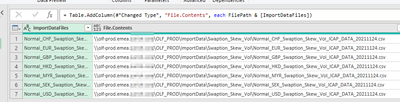
If you can predict the full filenames, you could dynamically generate them in your query as a single-column table, and then make a custom column with File.Contents and concatenate the new filenames with the folder path.  Can you give an example of a few full filenames?  Are they predictable?  Or have random characters?


Pat


Did I answer your question? Mark my post as a solution! Kudos are also appreciated!

To learn more about Power BI, follow me on Twitter or subscribe on YouTube.


@mahoneypa HoosierBI on YouTube


Hi @mahoneypat 


sure thing...yep, the filenames are static bar the date so they are easy to define.  I've created (I think) a table as you have suggested with the filepath and filenames....2021-11-25 16_49_46-ImportFiles - Power Query Editor.png


Helpful resources

Announcements
Join our Fabric User Panel

Join our Fabric User Panel

Share feedback directly with Fabric product managers, participate in targeted research studies and influence the Fabric roadmap.

February Power BI Update Carousel

Power BI Monthly Update - February 2026

Check out the February 2026 Power BI update to learn about new features.

FabCon Atlanta 2026 carousel

FabCon Atlanta 2026

Join us at FabCon Atlanta, March 16-20, for the ultimate Fabric, Power BI, AI and SQL community-led event. Save $200 with code FABCOMM.

Top Solution Authors