cancel
Showing results for 
Search instead for 
Did you mean: 

Learn from the best! Meet the four finalists headed to the FINALS of the Power BI Dataviz World Championships! Register now

Reply
Anonymous
Not applicable

Connect with MySQL

Hello,


At the moment I get my data from exports that are automatically added to a folder. But I get this export only once a day. In order to have real time data, I would like to connect to our MySQL database. But before I do that I just want to make sure if there are any pro's or con's for connecting directly with the database.


Can it have any influence on the database, or it speed for example?


Thanks in advance for sharing your experience.

1 ACCEPTED SOLUTION
Anonymous
Not applicable

Hi @Anonymous ,


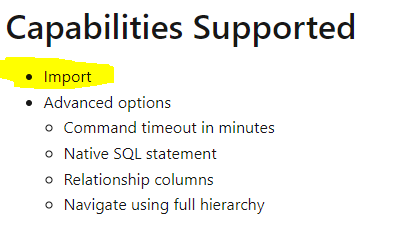
According to the official document, when connect to MySQL database, the only available connection mode is Import, which means that Power BI will cache the data that you’re connected to creating a point in time snapshot of your data. 

Eyelyn9_1-1638253467410.png


So let’s check out some pros and cons of the Import mode.

  • Gives you the full suite of transformation and data manipulation in the Desktop(Power Query)
  • There is a 1 GB limit to the Desktop if you plan on publishing to the PBI Service
  • You are able to use all M and DAX functions (notably all time intelligence functions), format fields however you desire, and there are no limitations to data modeling
  • You are able to combine data sources from various data sources (data flows, databases, csv)
  • In service, You can schedule up to 8 refreshes a day (Premium SKUs allow more)


Refer to:

https://hevodata.com/learn/mysql-to-power-bi/

https://tessellationtech.io/import-vs-direct-query-power-bi/

https://radacad.com/directquery-live-connection-or-import-data-tough-decision


Best Regards,
Eyelyn Qin
If this post helps, then please consider Accept it as the solution to help the other members find it more quickly.

View solution in original post

2 REPLIES 2
Anonymous
Not applicable

Hi @Anonymous ,


According to the official document, when connect to MySQL database, the only available connection mode is Import, which means that Power BI will cache the data that you’re connected to creating a point in time snapshot of your data. 

Eyelyn9_1-1638253467410.png


So let’s check out some pros and cons of the Import mode.

  • Gives you the full suite of transformation and data manipulation in the Desktop(Power Query)
  • There is a 1 GB limit to the Desktop if you plan on publishing to the PBI Service
  • You are able to use all M and DAX functions (notably all time intelligence functions), format fields however you desire, and there are no limitations to data modeling
  • You are able to combine data sources from various data sources (data flows, databases, csv)
  • In service, You can schedule up to 8 refreshes a day (Premium SKUs allow more)


Refer to:

https://hevodata.com/learn/mysql-to-power-bi/

https://tessellationtech.io/import-vs-direct-query-power-bi/

https://radacad.com/directquery-live-connection-or-import-data-tough-decision


Best Regards,
Eyelyn Qin
If this post helps, then please consider Accept it as the solution to help the other members find it more quickly.

KNP
Super User
Super User

Connecting directly to the database is always going to be preferred to extracting to files.

You obviously get the benefit of "real-time" data, potentially less overhead in maintaining extraction processes, etc. etc.


Yes, you can most definitely effect database performance. Just like you can if you run poorly written queries directly, e.g. SELECT * FROM myBiggestTable


You need to be careful when you decide whether you're going to choose 'import' or 'direct query' methods depending on data size and actual frequency required. Business often say they need the data to be "real-time" but rarely is that ever actually true. 

I would typically say, choose 'import' first over 'direct query'. 

Either way, there's always the temptation to hand author the query vs connecting to the tables and letting Power BI do the smart stuff in the background. Typically, writing the query yourself will cause query folding to break. There are some exceptions to this using the Value.NativeQuery() function but generally speaking, you're better off connecting to tables and use Power BI to do the filtering and transformations to give you the best chance of query folding working.

I'm not sure about MySQL but for MSSQL you can profile the performance of the queries to ensure minimum possible impact.


I hope this helps.


Have I solved your problem?
Please click Accept as Solution so I don't keep coming back to this post, oh yeah, others may find it useful also ;).
xOIEmaj

If you found this post helpful, please give Kudos.
It gives me a sense of instant gratification and, if you give me Kudos enough times, magical unicorns will appear on your screen.
If you find my signature vaguely amusing, please give Kudos.
image
fabric-SUbadge
Proud to be a Super User!

Helpful resources

Announcements
Join our Fabric User Panel

Join our Fabric User Panel

Share feedback directly with Fabric product managers, participate in targeted research studies and influence the Fabric roadmap.

February Power BI Update Carousel

Power BI Monthly Update - February 2026

Check out the February 2026 Power BI update to learn about new features.