We've captured the moments from FabCon & SQLCon that everyone is talking about, and we are bringing them to the community, live and on-demand. Starts on April 14th. Register now
Hello,
I have different versions for xlsx files, and I’ve created custom function for each version in order to group them.
Before I had more than one version for those xlsx, I had just one function to transform each xlsx and it was working very well. I could invoke it as figure 02 shows.
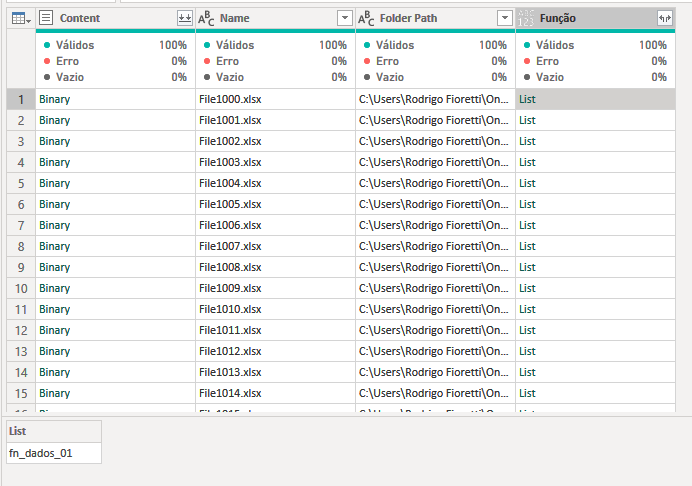
Now I have one function that indicates with function name power query should invoke to transform the file xlsx, but I can figure out how to invoke it. Figure 03.
Is there any way to call the custom function using a columns value as a parameter?
Figure 01 - Column that indicates which function to invoke.
Figure 02 – Previous query. Works fine for same xlsx versions.
Figure 03 – Current query. Can’t figure out how to invoke the function from column [Função].
Solved! Go to Solution.
Hi @r_fioretti,
A couple of things I want to call out:
Table.TransformColumns doesn't allow field access beyond the the column you're transforming, instead you can use Table.ReplaceValue.
Inside the [Funcao] I see a list with what appears to be a textual string, not a function. You'll need to access the list and if it is a string pass Expression.Evaluate as well.
Here's an example that illustrates both scenario's:
let
fxEven = (n) => n+1,
fxOdd = (n) => n+1,
Source = Table.FromColumns(
{{1..9}},
type table [ n =number]
),
AddListWithFunction = Table.AddColumn(Source, "Fx", each if Number.IsEven([n]) then {fxEven} else {fxOdd}),
ReplaceWithFunction = Table.ReplaceValue(AddListWithFunction,each [n],each Function.Invoke( [Fx]{0}, {[n]} ),Replacer.ReplaceValue,{"n"}),
AddListWithText = Table.AddColumn(ReplaceWithFunction, "Txt", each if Number.IsEven([n]) then {"fxEven2"} else {"fxOdd2"}),
ReplaceWithText = Table.ReplaceValue(AddListWithText,each [n],each Function.Invoke( Expression.Evaluate( [Txt]{0}, [fxEven2 = (n) => n+1, fxOdd2 = (n) => n+1] ), {[n]} ),Replacer.ReplaceValue,{"n"})
in
ReplaceWithText
Ps. If this helps solve your query please mark this post as Solution, thanks!
As you said Table.TransformColumns doesn't allow field access, so I added a new column instead of transforming the [Content] column.
Hi @r_fioretti,
A couple of things I want to call out:
Table.TransformColumns doesn't allow field access beyond the the column you're transforming, instead you can use Table.ReplaceValue.
Inside the [Funcao] I see a list with what appears to be a textual string, not a function. You'll need to access the list and if it is a string pass Expression.Evaluate as well.
Here's an example that illustrates both scenario's:
let
fxEven = (n) => n+1,
fxOdd = (n) => n+1,
Source = Table.FromColumns(
{{1..9}},
type table [ n =number]
),
AddListWithFunction = Table.AddColumn(Source, "Fx", each if Number.IsEven([n]) then {fxEven} else {fxOdd}),
ReplaceWithFunction = Table.ReplaceValue(AddListWithFunction,each [n],each Function.Invoke( [Fx]{0}, {[n]} ),Replacer.ReplaceValue,{"n"}),
AddListWithText = Table.AddColumn(ReplaceWithFunction, "Txt", each if Number.IsEven([n]) then {"fxEven2"} else {"fxOdd2"}),
ReplaceWithText = Table.ReplaceValue(AddListWithText,each [n],each Function.Invoke( Expression.Evaluate( [Txt]{0}, [fxEven2 = (n) => n+1, fxOdd2 = (n) => n+1] ), {[n]} ),Replacer.ReplaceValue,{"n"})
in
ReplaceWithText
Ps. If this helps solve your query please mark this post as Solution, thanks!
As you said Table.TransformColumns doesn't allow field access, so I added a new column instead of transforming the [Content] column.
If you have recently started exploring Fabric, we'd love to hear how it's going. Your feedback can help with product improvements.
A new Power BI DataViz World Championship is coming this June! Don't miss out on submitting your entry.
Share feedback directly with Fabric product managers, participate in targeted research studies and influence the Fabric roadmap.
| User | Count |
|---|---|
| 6 | |
| 4 | |
| 3 | |
| 2 | |
| 2 |
| User | Count |
|---|---|
| 11 | |
| 10 | |
| 7 | |
| 7 | |
| 6 |