This time we’re going bigger than ever. Fabric, Power BI, SQL, AI and more. We're covering it all. You won't want to miss it.
Learn moreLevel up your Power BI skills this month - build one visual each week and tell better stories with data! Get started
Hi,
I'm trying to import all files stored on an Azure File Service based folder. I get an I/O error, I guess because I can't provide any user name/password. When I map a drive everything works however this won't allow me to upload my solution to the Power BI Service. So any idea how I can fix this?
Hi @TePe,
Can you show the detail error message or screenshot about the I/O error? What do you mean "however this won't allow me to upload my solution to the Power BI Service"? Please share detail information about the issue.
Best Regards,
Qiuyun Yu
Hi,
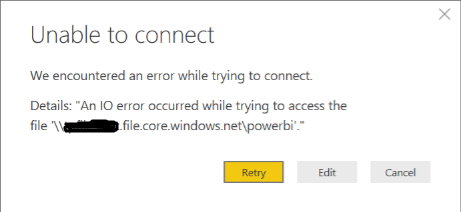
this is the error I see:
As I said I can map a drive to the share, then everything works fine. However mapping a drive is a local activity. A drive called i.e. "Q:" mapped to the network share won't help me when I try to refresh the data in the Power BI Service because it won't know the drive "Q:". So I think I need to have a direct link to the network share which doesn't work (see the error above). There might be a workaround like installing a local gateway which has the drive mapped but this would mean that when I refresh the data all files need to go from the cloud through my local gateway and back into the cloud...
Check out the April 2026 Power BI update to learn about new features.
Sign up to receive a private message when registration opens and key events begin.
If you have recently started exploring Fabric, we'd love to hear how it's going. Your feedback can help with product improvements.
| User | Count |
|---|---|
| 3 | |
| 2 | |
| 2 | |
| 2 | |
| 2 |