Become a Certified Power BI Data Analyst!
Join us for an expert-led overview of the tools and concepts you'll need to pass exam PL-300. The first session starts on June 11th. See you there!
Get registered- Power BI forums
- Get Help with Power BI
- Desktop
- Service
- Report Server
- Power Query
- Mobile Apps
- Developer
- DAX Commands and Tips
- Custom Visuals Development Discussion
- Health and Life Sciences
- Power BI Spanish forums
- Translated Spanish Desktop
- Training and Consulting
- Instructor Led Training
- Dashboard in a Day for Women, by Women
- Galleries
- Webinars and Video Gallery
- Data Stories Gallery
- Themes Gallery
- Contests Gallery
- Quick Measures Gallery
- Notebook Gallery
- Translytical Task Flow Gallery
- R Script Showcase
- Ideas
- Custom Visuals Ideas (read-only)
- Issues
- Issues
- Events
- Upcoming Events
Power BI is turning 10! Let’s celebrate together with dataviz contests, interactive sessions, and giveaways. Register now.
- Power BI forums
- Forums
- Get Help with Power BI
- Power Query
- Re: Insert a line break in the middle of Power Que...
- Subscribe to RSS Feed
- Mark Topic as New
- Mark Topic as Read
- Float this Topic for Current User
- Bookmark
- Subscribe
- Printer Friendly Page


- Mark as New
- Bookmark
- Subscribe
- Mute
- Subscribe to RSS Feed
- Permalink
- Report Inappropriate Content
Insert a line break in the middle of Power Query text (not a text in Excel)
Hi,
I am building some "fake" queries to store instructions for my Power Query user. One might looke like this:
let
MyText = "Instructions
Welcome to the ...
Step 1:  ...
Step 2: ...
..."
in MyText
But Power Query does not let me have these line breaks. I have also tried.
let
MyText = "Instructions" & #(lf) &
Welcome to the ..."
in MyText
and:
let
MyText = "Instructions" & unichar(10) &
Welcome to the ..."
in MyText
Any ideas guys?
Solved! Go to Solution.


- Mark as New
- Bookmark
- Subscribe
- Mute
- Subscribe to RSS Feed
- Permalink
- Report Inappropriate Content
Hi @freelensia
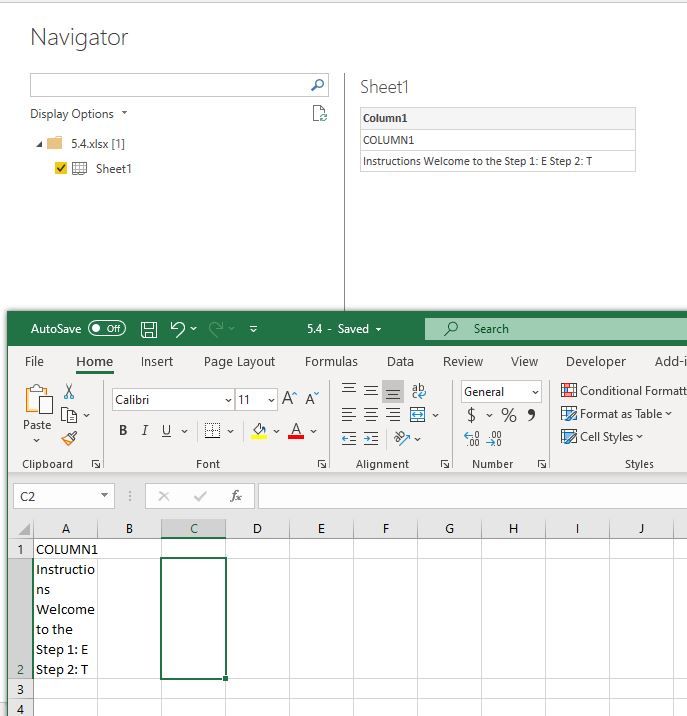
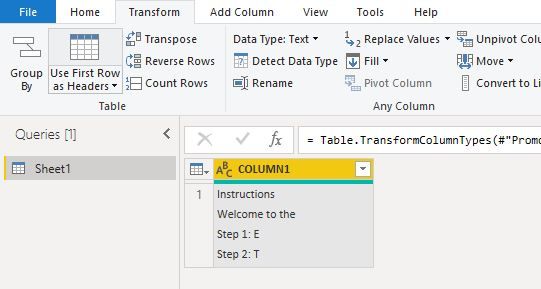
You could paste your test into one cell of an excel file, then load that table from excel with Power BI.
Best Regards
Maggie
Community Support Team _ Maggie Li
If this post helps, then please consider Accept it as the solution to help the other members find it more quickly.


- Mark as New
- Bookmark
- Subscribe
- Mute
- Subscribe to RSS Feed
- Permalink
- Report Inappropriate Content
really late answer, but might be useful for others
assuming you want to replace the semicolumns by a return to the line this line of M code might help
= Table.ReplaceValue(#"Changed Type",each [Column1],each Text.Replace([Column1],";", "#(lf)"),Replacer.ReplaceText,{"Column1"})
- Mark as New
- Bookmark
- Subscribe
- Mute
- Subscribe to RSS Feed
- Permalink
- Report Inappropriate Content
Hi @freelensia
You could paste your test into one cell of an excel file, then load that table from excel with Power BI.
Best Regards
Maggie
Community Support Team _ Maggie Li
If this post helps, then please consider Accept it as the solution to help the other members find it more quickly.
- Mark as New
- Bookmark
- Subscribe
- Mute
- Subscribe to RSS Feed
- Permalink
- Report Inappropriate Content
Never mind. I solved it with.
& Character.FromNumber(10)&
Pretty annoying to have to insert this at the end of every line. Plus if I have the double quotation mark in the text I must replace it with & Character.FromNumber(34) &.
Any other ideas?
- Mark as New
- Bookmark
- Subscribe
- Mute
- Subscribe to RSS Feed
- Permalink
- Report Inappropriate Content
The "& Character.FromNumber(10) &" works. The "#(lf)" does not seem to work in actual query strings (it simply gives an error looking for a token). The "Use Excel instead of Power Query" answer did not address the original issue at all. Thanks, freelensia, for following through and finding a solution that works.

- Mark as New
- Bookmark
- Subscribe
- Mute
- Subscribe to RSS Feed
- Permalink
- Report Inappropriate Content
Maybe too late to answer, but for anyone in future arriving here from Google:
These special strings are really handy:
- Line feed: "#(lf)"
- Carriage return: "#(cr)"
- Tab: "#(tab)"
Also keep in mind that depending on the target OS that the text will be used in, dealing with line breaks can be slightly different. For example in Windows, it's usually CR + LF that you need to be safe in all apps (notepad anyone?), otherwise you may get away with a LF character.
- Mark as New
- Bookmark
- Subscribe
- Mute
- Subscribe to RSS Feed
- Permalink
- Report Inappropriate Content
Thanks, for me, this is The Solution.

Helpful resources

Power BI Monthly Update - June 2025
Check out the June 2025 Power BI update to learn about new features.

Fabric Community Update - June 2025
Find out what's new and trending in the Fabric community.


| User | Count |
|---|---|
| 12 | |
| 12 | |
| 11 | |
| 7 | |
| 7 |


