cancel
Showing results for 
Search instead for 
Did you mean: 

Next up in the FabCon + SQLCon recap series: The roadmap for Microsoft SQL and Maximizing Developer experiences in Fabric. All sessions are available on-demand after the live show. Register now

Reply
freelensia
Advocate II
Advocate II

Insert a line break in the middle of Power Query text (not a text in Excel)

Hi,


I am building some "fake" queries to store instructions for my Power Query user. One might looke like this:


let 
MyText = "Instructions
Welcome to the ...
Step 1:  ...
Step 2: ...
..."
in MyText


 But Power Query does not let me have these line breaks. I have also tried.


let 
MyText = "Instructions" & #(lf) &
Welcome to the ..."
in MyText


and:


let 
MyText = "Instructions" & unichar(10) &
Welcome to the ..."
in MyText


 Any ideas guys?

1 ACCEPTED SOLUTION
v-juanli-msft
Community Support
Community Support

Hi @freelensia 

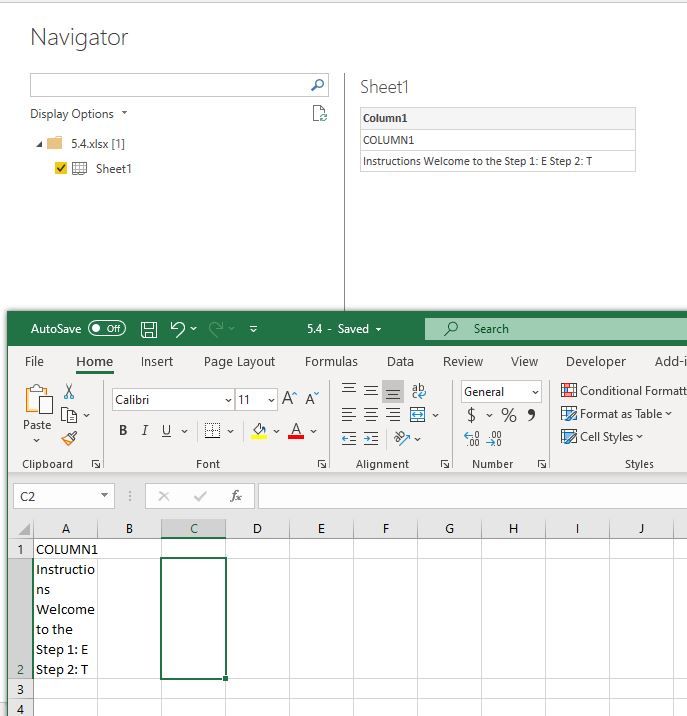
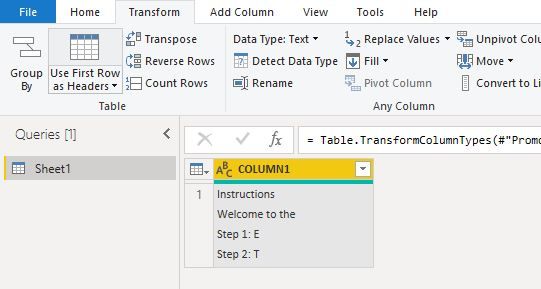
You could paste your test into one cell of an excel file, then load that table from excel with Power BI.

Capture1.JPGCapture2.JPG


Best Regards
Maggie
Community Support Team _ Maggie Li
If this post helps, then please consider Accept it as the solution to help the other members find it more quickly.


View solution in original post

6 REPLIES 6
marcl2
Advocate I
Advocate I

really late answer, but might be useful for others
assuming you want to replace the semicolumns by a return to the line this line of M code might help


= Table.ReplaceValue(#"Changed Type",each [Column1],each Text.Replace([Column1],";", "#(lf)"),Replacer.ReplaceText,{"Column1"})

v-juanli-msft
Community Support
Community Support

Hi @freelensia 

You could paste your test into one cell of an excel file, then load that table from excel with Power BI.

Capture1.JPGCapture2.JPG


Best Regards
Maggie
Community Support Team _ Maggie Li
If this post helps, then please consider Accept it as the solution to help the other members find it more quickly.


freelensia
Advocate II
Advocate II

Never mind. I solved it with.


&  Character.FromNumber(10)&


Pretty annoying to have to insert this at the end of every line. Plus if I have the double quotation mark in the text I must replace it with & Character.FromNumber(34) &.


Any other ideas?  

Anonymous
Not applicable

The "& Character.FromNumber(10) &" works. The "#(lf)" does not seem to work in actual query strings (it simply gives an error looking for a token). The "Use Excel instead of Power Query" answer did not address the original issue at all. Thanks, freelensia, for following through and finding a solution that works.

Maybe too late to answer, but for anyone in future arriving here from Google:

These special strings are really handy:

  • Line feed: "#(lf)"
  • Carriage return: "#(cr)"
  • Tab: "#(tab)"

Also keep in mind that depending on the target OS that the text will be used in, dealing with line breaks can be slightly different. For example in Windows, it's usually CR + LF that you need to be safe in all apps (notepad anyone?), otherwise you may get away with a LF character.

Thanks, for me, this is The Solution. 

Helpful resources

Announcements
New to Fabric survey Carousel

New to Fabric Survey

If you have recently started exploring Fabric, we'd love to hear how it's going. Your feedback can help with product improvements.

Power BI DataViz World Championships carousel

Power BI DataViz World Championships - June 2026

A new Power BI DataViz World Championship is coming this June! Don't miss out on submitting your entry.

Join our Fabric User Panel

Join our Fabric User Panel

Share feedback directly with Fabric product managers, participate in targeted research studies and influence the Fabric roadmap.

March Power BI Update Carousel

Power BI Community Update - March 2026

Check out the March 2026 Power BI update to learn about new features.