This time we’re going bigger than ever. Fabric, Power BI, SQL, AI and more. We're covering it all. You won't want to miss it.
Learn moreLevel up your Power BI skills this month - build one visual each week and tell better stories with data! Get started
I have a table in SQL that loads in Power BI, in that table has only a Number column.
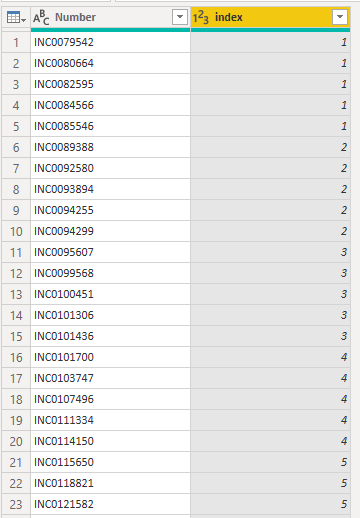
I Want to know if there is any way to create the index column in Power Query?
The index column count every five rows of the column Number.
I created this column using R language, but I cannot use R in my organization
Solved! Go to Solution.
Hi @Anonymous
There is an option Create Index Column (From 1) in Power Query Editor mode. So, add this index column.
next, add a Custom column:
= Number.RoundUp([Index]/5)full power query example:
let
Source = Table.FromRows(Json.Document(Binary.Decompress(Binary.FromText("HcS5DQAgDATBXi6mI8sBYH7oP0XaCcZMWZ5MhSsHN+48ePLizYcvP7l/", BinaryEncoding.Base64), Compression.Deflate)), let _t = ((type text) meta [Serialized.Text = true]) in type table [Column1 = _t]),
#"Changed Type" = Table.TransformColumnTypes(Source,{{"Column1", type text}}),
#"Added Index" = Table.AddIndexColumn(#"Changed Type", "Index", 1, 1),
#"Added Custom" = Table.AddColumn(#"Added Index", "Custom", each Number.RoundUp([Index]/5)),
#"Removed Columns" = Table.RemoveColumns(#"Added Custom",{"Index"})
in
#"Removed Columns"do not hesitate to give a kudo to useful posts and mark solutions as solution
Hi @Anonymous
There is an option Create Index Column (From 1) in Power Query Editor mode. So, add this index column.
next, add a Custom column:
= Number.RoundUp([Index]/5)full power query example:
let
Source = Table.FromRows(Json.Document(Binary.Decompress(Binary.FromText("HcS5DQAgDATBXi6mI8sBYH7oP0XaCcZMWZ5MhSsHN+48ePLizYcvP7l/", BinaryEncoding.Base64), Compression.Deflate)), let _t = ((type text) meta [Serialized.Text = true]) in type table [Column1 = _t]),
#"Changed Type" = Table.TransformColumnTypes(Source,{{"Column1", type text}}),
#"Added Index" = Table.AddIndexColumn(#"Changed Type", "Index", 1, 1),
#"Added Custom" = Table.AddColumn(#"Added Index", "Custom", each Number.RoundUp([Index]/5)),
#"Removed Columns" = Table.RemoveColumns(#"Added Custom",{"Index"})
in
#"Removed Columns"do not hesitate to give a kudo to useful posts and mark solutions as solution
Check out the April 2026 Power BI update to learn about new features.
Sign up to receive a private message when registration opens and key events begin.
If you have recently started exploring Fabric, we'd love to hear how it's going. Your feedback can help with product improvements.
| User | Count |
|---|---|
| 3 | |
| 2 | |
| 2 | |
| 2 | |
| 2 |