cancel
Showing results for 
Search instead for 
Did you mean: 

A new Data Days event is coming soon! This time we’re going bigger than ever. Fabric, Power BI, SQL, AI and more. Don't miss out.

Reply
Anonymous
Not applicable

Index column in Power Query

Capture.PNG


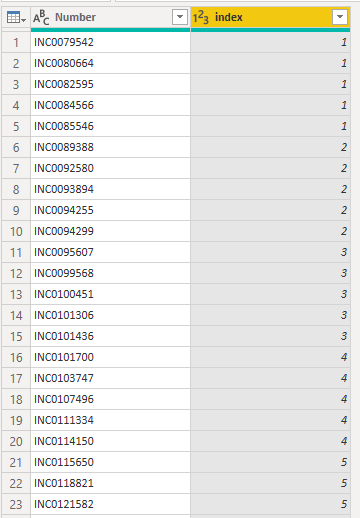
I have a table in SQL that loads in Power BI, in that table has only a Number column.


I Want to know if there is any way to create the index column in Power Query?


The index column count every five rows of the column Number.


I created this column using R language, but I cannot use R in my organization

1 ACCEPTED SOLUTION
az38
Community Champion
Community Champion

Hi @Anonymous 

There is an option Create Index Column (From 1) in Power Query Editor mode. So, add this index column.

next, add a Custom column:

= Number.RoundUp([Index]/5)

full power query example:

let
    Source = Table.FromRows(Json.Document(Binary.Decompress(Binary.FromText("HcS5DQAgDATBXi6mI8sBYH7oP0XaCcZMWZ5MhSsHN+48ePLizYcvP7l/", BinaryEncoding.Base64), Compression.Deflate)), let _t = ((type text) meta [Serialized.Text = true]) in type table [Column1 = _t]),
    #"Changed Type" = Table.TransformColumnTypes(Source,{{"Column1", type text}}),
    #"Added Index" = Table.AddIndexColumn(#"Changed Type", "Index", 1, 1),
    #"Added Custom" = Table.AddColumn(#"Added Index", "Custom", each Number.RoundUp([Index]/5)),
    #"Removed Columns" = Table.RemoveColumns(#"Added Custom",{"Index"})
in
    #"Removed Columns"

do not hesitate to give a kudo to useful posts and mark solutions as solution

LinkedIn


do not hesitate to give a kudo to useful posts and mark solutions as solution
LinkedIn

View solution in original post

2 REPLIES 2
az38
Community Champion
Community Champion

Hi @Anonymous 

There is an option Create Index Column (From 1) in Power Query Editor mode. So, add this index column.

next, add a Custom column:

= Number.RoundUp([Index]/5)

full power query example:

let
    Source = Table.FromRows(Json.Document(Binary.Decompress(Binary.FromText("HcS5DQAgDATBXi6mI8sBYH7oP0XaCcZMWZ5MhSsHN+48ePLizYcvP7l/", BinaryEncoding.Base64), Compression.Deflate)), let _t = ((type text) meta [Serialized.Text = true]) in type table [Column1 = _t]),
    #"Changed Type" = Table.TransformColumnTypes(Source,{{"Column1", type text}}),
    #"Added Index" = Table.AddIndexColumn(#"Changed Type", "Index", 1, 1),
    #"Added Custom" = Table.AddColumn(#"Added Index", "Custom", each Number.RoundUp([Index]/5)),
    #"Removed Columns" = Table.RemoveColumns(#"Added Custom",{"Index"})
in
    #"Removed Columns"

do not hesitate to give a kudo to useful posts and mark solutions as solution

LinkedIn


do not hesitate to give a kudo to useful posts and mark solutions as solution
LinkedIn
Anonymous
Not applicable

Thank you @az38 .

Helpful resources

Announcements
May Power BI Update Carousel

Power BI Monthly Update - May 2026

Check out the May 2026 Power BI update to learn about new features.

Fabric SQL PBI Data Days

Data Days 2026 coming soon!

Sign up to receive a private message when registration opens and key events begin.

New to Fabric survey Carousel

New to Fabric Survey

If you have recently started exploring Fabric, we'd love to hear how it's going. Your feedback can help with product improvements.

Power BI DataViz World Championships carousel

Power BI DataViz World Championships - June 2026

A new Power BI DataViz World Championship is coming this June! Don't miss out on submitting your entry.