Don't miss your chance to take exam DP-600 or DP-700 on us!
Request nowLearn from the best! Meet the four finalists headed to the FINALS of the Power BI Dataviz World Championships! Register now
Hi all,
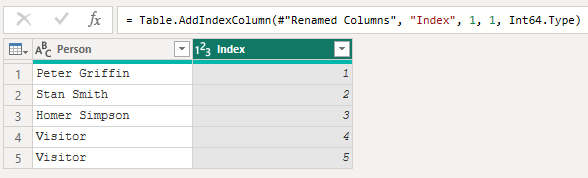
Can anyone please tell me how I can add an index colum but only for certain rows? So for example in the data below
I would like rows 4 and 5 to be 1 and 2 respectively.
Thanks
Solved! Go to Solution.
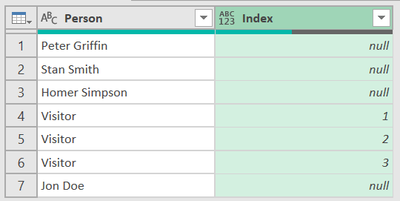
Hi @davidgray42, check this.
Result:
let
Source = Table.FromRows(Json.Document(Binary.Decompress(Binary.FromText("i45WCkgtSS1ScC/KTEvLzFOK1YlWCi5JzFMIzs0syQBzPfJzgQqCM3MLivMhCsIyizNL8osw2F75eQou+amo4rEA", BinaryEncoding.Base64), Compression.Deflate)), let _t = ((type nullable text) meta [Serialized.Text = true]) in type table [Person = _t]),
#"Grouped Rows" = Table.Group(Source, {"Person"}, {{"All", each _, type table [Person=nullable text]}}),
Ad_AllWithIndex = Table.AddColumn(#"Grouped Rows", "All With Index", each if Text.StartsWith([Person], "Visitor", Comparer.OrdinalIgnoreCase) then Table.AddIndexColumn([All], "Index", 1, 1, Int64.Type) else [All], type table),
ExpandedAllWithIndex = Table.ExpandTableColumn(Ad_AllWithIndex, "All With Index", {"Index"}, {"Index"}),
RemovedColumns = Table.RemoveColumns(ExpandedAllWithIndex,{"All"})
in
RemovedColumns
Hi @davidgray42, check this.
Result:
let
Source = Table.FromRows(Json.Document(Binary.Decompress(Binary.FromText("i45WCkgtSS1ScC/KTEvLzFOK1YlWCi5JzFMIzs0syQBzPfJzgQqCM3MLivMhCsIyizNL8osw2F75eQou+amo4rEA", BinaryEncoding.Base64), Compression.Deflate)), let _t = ((type nullable text) meta [Serialized.Text = true]) in type table [Person = _t]),
#"Grouped Rows" = Table.Group(Source, {"Person"}, {{"All", each _, type table [Person=nullable text]}}),
Ad_AllWithIndex = Table.AddColumn(#"Grouped Rows", "All With Index", each if Text.StartsWith([Person], "Visitor", Comparer.OrdinalIgnoreCase) then Table.AddIndexColumn([All], "Index", 1, 1, Int64.Type) else [All], type table),
ExpandedAllWithIndex = Table.ExpandTableColumn(Ad_AllWithIndex, "All With Index", {"Index"}, {"Index"}),
RemovedColumns = Table.RemoveColumns(ExpandedAllWithIndex,{"All"})
in
RemovedColumns
Hi,
This is a turnstile card system, so visitors are given temparay cards to enter the building. I would like this to show on reports as Visitor1, Visitor2 etc but there's no need to append a number to the end of a named card.
What's the logic behind applying the index to rows 4 and 5? Only Index the 'Visitor' rows? or specifically rows 4,5 regardless of data?
Share feedback directly with Fabric product managers, participate in targeted research studies and influence the Fabric roadmap.
Check out the February 2026 Power BI update to learn about new features.
| User | Count |
|---|---|
| 11 | |
| 8 | |
| 7 | |
| 5 | |
| 5 |